Subscriptions: lifecycle and statuses
Follow the store's subscriptions, understand each status, how renewals, free trials, cycle limits and declined charges work, and what the subscriber receives.
A subscription is born when someone buys a recurring offer in the checkout. From then on, the card saved at purchase is charged every cycle, without the subscriber having to come back to the store. This page shows where to follow subscriptions and what happens in each phase. To pause, cancel or change someone's plan, see Pause, cancel, reactivate and change plans.
Before you start
- A subscription offer with a price and a cycle set. See Create an offer.
- A provider that supports subscriptions connected to the store, such as Stripe, Pagar.me or Asaas. Mercado Pago does not do subscriptions. See Features by provider.
- Any project role, including Sales, sees subscriptions and acts on them.
The subscriptions list
Open SalesSubscriptions. The list shows subscriptions newest first, 25 per page.
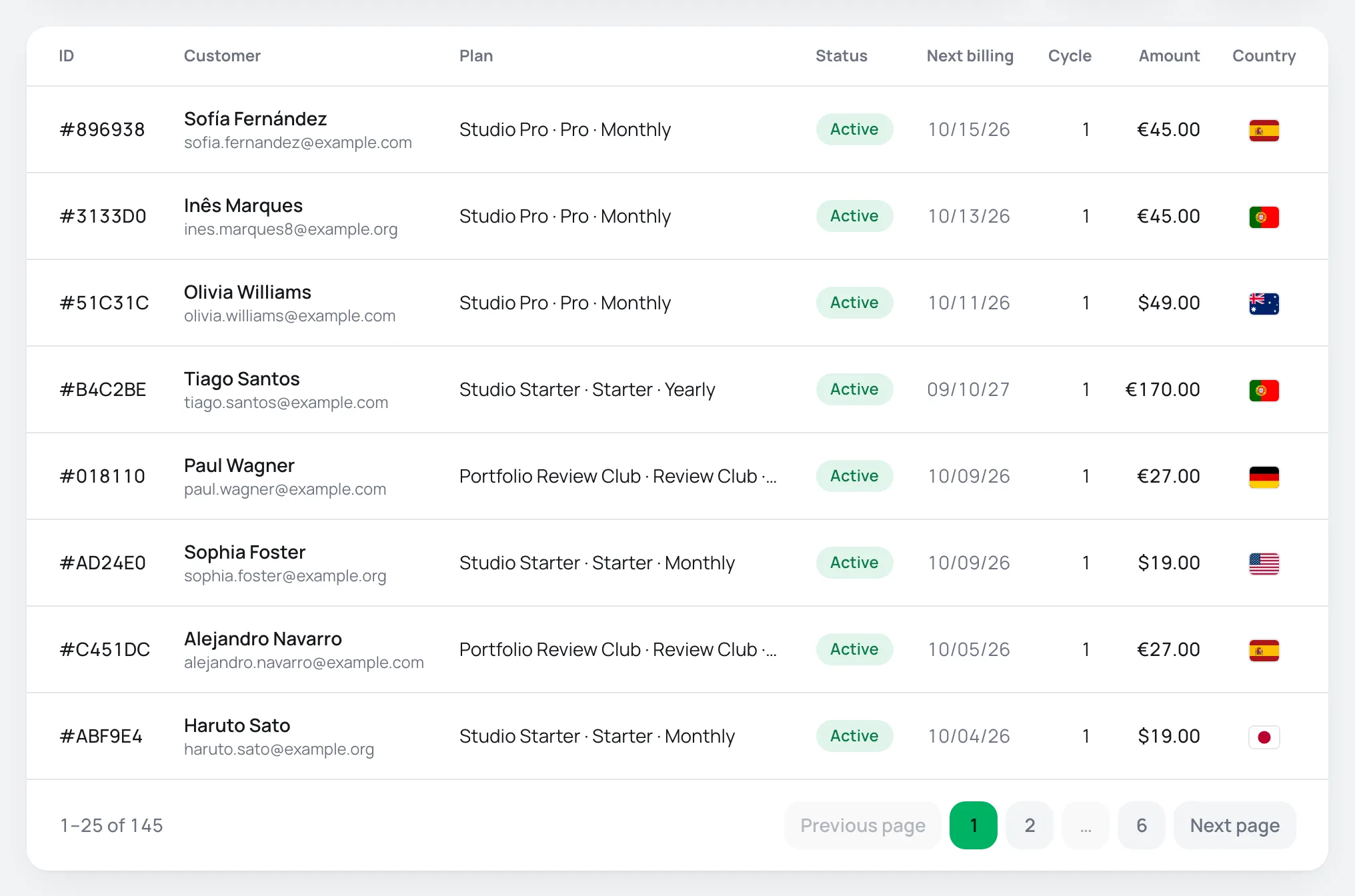
| Column | What it shows |
|---|---|
| ID | The subscription's short code. Click it to open its page. |
| Customer | The subscriber's name and e-mail. |
| Plan | The subscribed product and offer. |
| Status | The current status. Below it you see Cancels at period end and, when in dunning, how many retries were already made and the date of the next one. |
| Next billing | The date of the next charge. |
| Cycle | How many cycles were already charged. On an offer with a limit, it shows as 3 / 12. |
| Amount | The amount charged each cycle, in the subscription's currency. |
| Country | The subscriber's country. |
Above the list, you can search by code, e-mail, subscriber name or offer name, filter by status and filter by the date the subscription started.
Subscription statuses
| Status | What it means | Is the subscriber charged? |
|---|---|---|
| Trialing | The offer's free trial period is running. The card was validated at purchase and the first charge happens at the end of the trial. | At the end of the trial |
| Active | The subscription is up to date. | Yes, every cycle |
| Dunning | The renewal charge was declined and the payment platform is trying again. | On the retries |
| Paused | Someone at the store paused the subscription. | No, until it is resumed |
| Cancelled | The subscription was canceled. | No |
| Expired | The subscription ended. For access and e-mails, it counts as canceled. | No |
When a cancellation was scheduled for the end of the period, the subscription stays Active until then and shows Cancels at period end.
How each phase works
Purchase and free trial
The subscription starts in the checkout, always with a card: subscriptions don't accept PIX (the Brazilian instant payment). The card is saved for the next charges, and the checkout tells the buyer so.
If the offer has a trial period, the subscription starts as Trialing. The card is validated on the day of purchase and the first charge happens when the trial ends. The date shows in Trial ends, on the subscription's page. If the offer has a first charge with a different amount, it only applies to the first charge. See Create an offer.
Renewals
On the next billing date, the saved card is charged on its own, by the same payment account that made the first charge. Each approved renewal:
- becomes an order in SalesTransactions, of type Renewal;
- moves the Cycle counter and the Next billing forward;
- sends the subscriber the Renewal charged e-mail, if the store sends e-mails;
- notifies the integrations, such as webhooks and automations.
Declined charge and retries
If the renewal charge is declined, the subscription moves to Dunning. Its page shows a banner with Dunning since, the number of retries and the Next retry. How many times and how often the charge is retried depends on the payment platform, not on a store setting.
Meanwhile:
- The subscriber gets the Subscription payment problem e-mail, with a button to update the card in the customer portal. It is one e-mail per period, however many retries happen.
- In the customer portal, the subscription shows a pending payment notice. See Change card or plan, or cancel the subscription.
- Access to the member area continues. It is only removed when the subscription is canceled or ends.
When a retry is approved, the subscription leaves dunning. The HomeDashboard shows how many subscriptions went into dunning in the period and how many were recovered. See Understand the home dashboard.
Cycle limit
On an offer with Cycle limit, the Cycle column shows the progress toward the limit. What happens after the last cycle follows the offer's Renew after the last cycle and Renewal offer options.
End of the subscription
When the subscription is canceled or ends:
- the subscriber gets the Subscription cancelled e-mail, if the store sends e-mails;
- access to the member areas linked to the product is removed. See How member areas work;
- the integrations get the cancellation notice.
A cancellation scheduled for the end of the period only triggers this when the period ends.
The subscription page
Click a subscription to open its page. The top holds the status, the amount with the cycle, the subscriber and the action buttons.
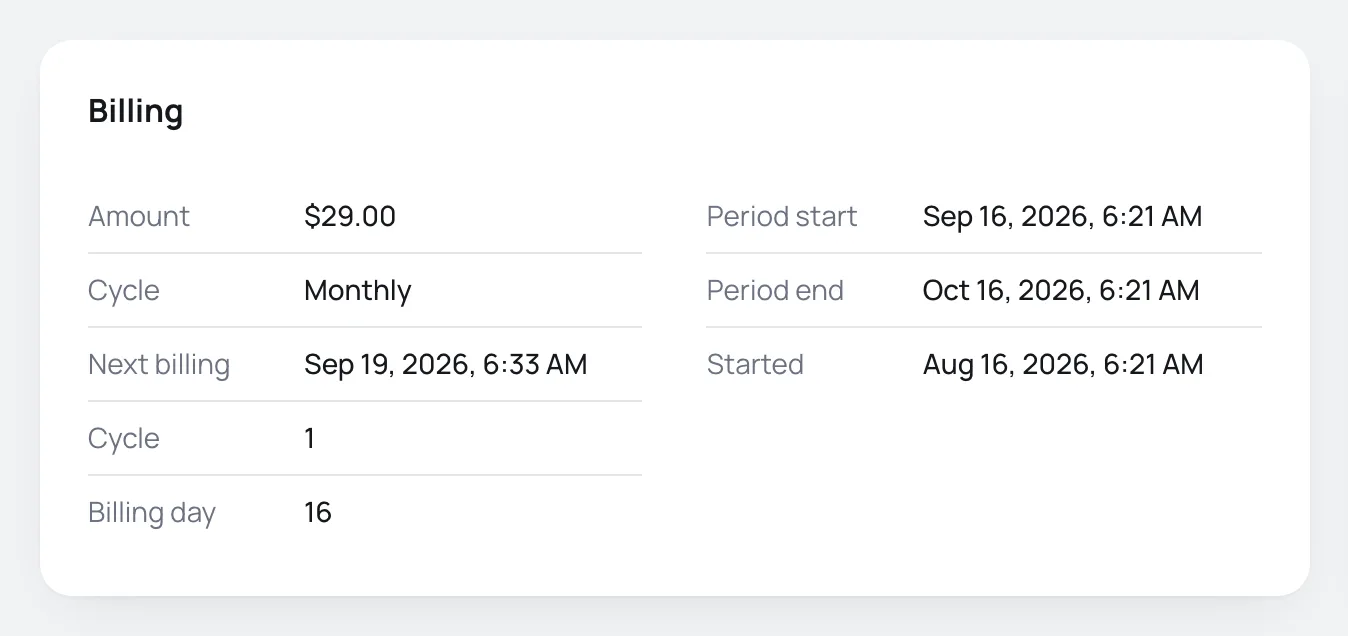
- Billing: Amount, Cycle, Next billing, cycle count, Billing day, Period start and Period end of the current cycle, Started and, when present, Trial ends and Cancelled with the reason.
- Orders: each charge of the subscription, with date, type (First charge, Renewal or Extra charge), provider, status and amount. Click it to open the order.
- Timeline: the history of changes, newest first.
- Customer: the subscriber's details, with a link to their page in SalesCustomers.
- Payment details: the provider that charges the subscription and in how many Installments it is charged.
- Technical details: the full Subscription ID and the Payment instrument (the saved card), for support.
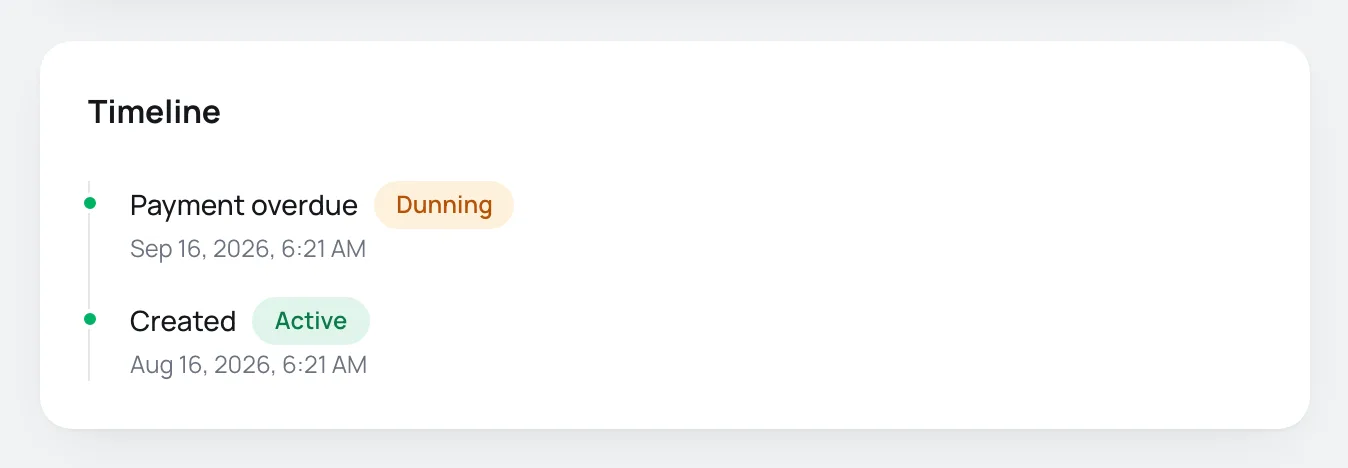
The timeline records these events:
| Event | When |
|---|---|
| Created | The subscription started. |
| Renewed | A renewal was charged. |
| Payment overdue | The charge was declined and the retries started. |
| Moved to a higher plan / Moved to a lower plan | The plan changed. |
| Payment method changed | The card was changed, for example by the subscriber in the portal. |
| Paused / Resumed | The subscription was paused or resumed. |
| Cancellation scheduled for the end of the period | Someone scheduled the cancellation. |
| Cancelled / Expired | The subscription ended. |
| Reactivated | A canceled subscription became valid again. |
What the subscriber receives
E-mails to the subscriber only go out if the store connected an e-mail provider. See Transactional e-mail: how it works. Each e-mail can be turned on, turned off and edited in GeneralSettingsE-mails.
| When it goes out | On by default? | |
|---|---|---|
| Renewal charged | On each approved renewal, as a receipt. | Yes |
| Subscription payment problem | The renewal was declined. | Yes |
| Subscription cancelled | The subscription was canceled or ended. | Yes |
| Upcoming renewal | A few days before the renewal. By default, 7 days before and only on quarterly or longer cycles. | No |
| Plan changed | The plan changed. | No |
| Payment method changed | The subscription's card was changed. | No |
In the customer portal, the subscriber sees their subscriptions, changes the card and, if the store allows it, cancels on their own. See Customer portal.
Common problems
-
The list is empty
Subscriptions start when a customer buys a recurring offer. Check that the offer is a subscription and that there has already been a paid purchase through it.
-
The subscription has been in dunning for days
The payment platform keeps trying to charge the card. Ask the subscriber to update the card through the link in the Subscription payment problem e-mail or through the customer portal.
-
The status in Vipter looks out of date
On the subscription's page, open the actions menu and use Resync. Vipter fetches the current state from the payment platform.
What to do next
- Pause, cancel, reactivate and change the plan of a subscription.
- Charge an extra amount on the saved card, outside the cycle.
- Set up product families to allow upgrades and downgrades.
Abandoned checkouts
See who filled in the checkout and left without trying to pay, read the recovery numbers, open each record and copy the recovery link.
Pause, cancel, reactivate and change plans
Change a subscription from the dashboard and see what each action does to the charges, the access and the notices to the subscriber.