One-click upsell and downsell
Show offers right after payment, charged with one click on the purchase card or with a new PIX, and build the sequence of upsells and downsells.
The upsell is a page that shows right after the buyer pays: "Want 3 more jars at 40% OFF?". If they accept, the purchase happens on the spot, without filling in anything again. Buyers who paid by card buy with one click, on the same card. Buyers who paid with PIX (Brazil's instant payment) get a new PIX code.
Each accepted step is a new charge and a new order. To add a product to the same charge, before paying, use the order bump.
An offer can have up to 4 steps, in sequence. Each step is an upsell or a downsell:
- Upsell: Always shown, in list order.
- Downsell: Shown only when the step before it was declined. Use it to offer a cheaper version to those who declined.
Before you start
- The main offer, which can be one-time or a subscription.
- Another one-time offer to sell in the step. Subscriptions can't be sold in the upsell. See Create an offer.
- For the one-click card charge: a card provider that can make that charge. On the provider screen, under Features, One-click upsell shows in green. Mercado Pago can't. Without it, the step offers PIX. See How payments work.
- The Admin or Owner role in the Vipter project.
Step 1: open the funnel card
Open CatalogProducts, click the product and then the main offer. On the offer page, click Add step on the One-click Upsell card.
Step 2: build the step
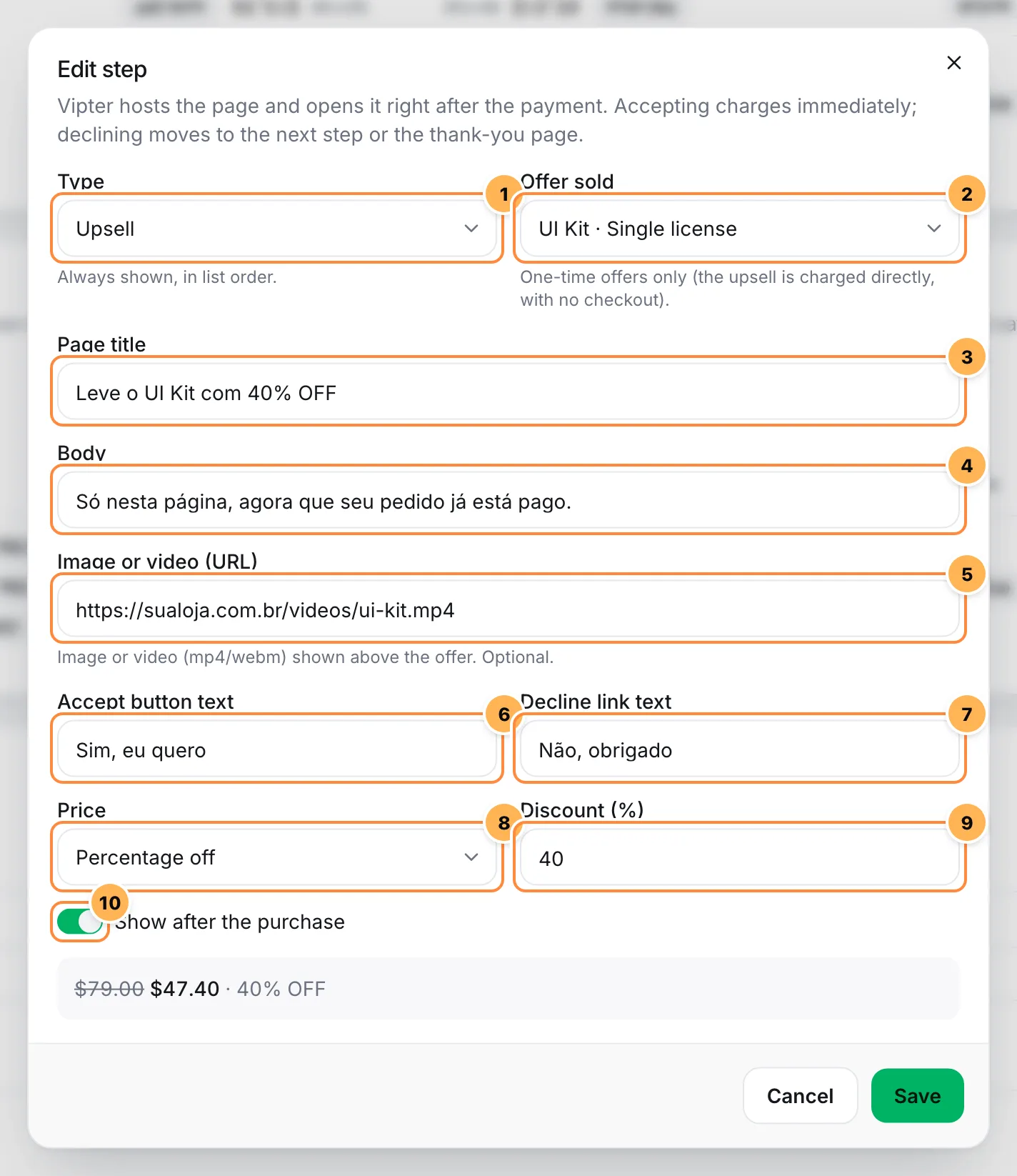
- Type: Upsell or Downsell.
- Offer sold: the one-time offer the page sells, or one of its packs. The list groups offers by product.
- Page title: the page title, up to 140 characters.
- Body: optional, up to 600 characters.
- Image or video (URL): optional. An image address or an MP4 or WebM video address, shown above the offer.
- Accept button text: optional, up to 80 characters. When empty, the button uses a default text to pay by card or generate the PIX.
- Decline link text: optional, up to 80 characters. When empty, it uses a default decline text.
- Price: Offer price, Percentage off on that price, or Fixed price (BRL) in the store currency, converted at the day's rate in other currencies.
- The discount or fixed price value. The preview below shows the full price, the step price and the discount.
- Show after the purchase: when off, the step is skipped without being deleted.
Click Save. Repeat for the other steps.
Step 3: order and track
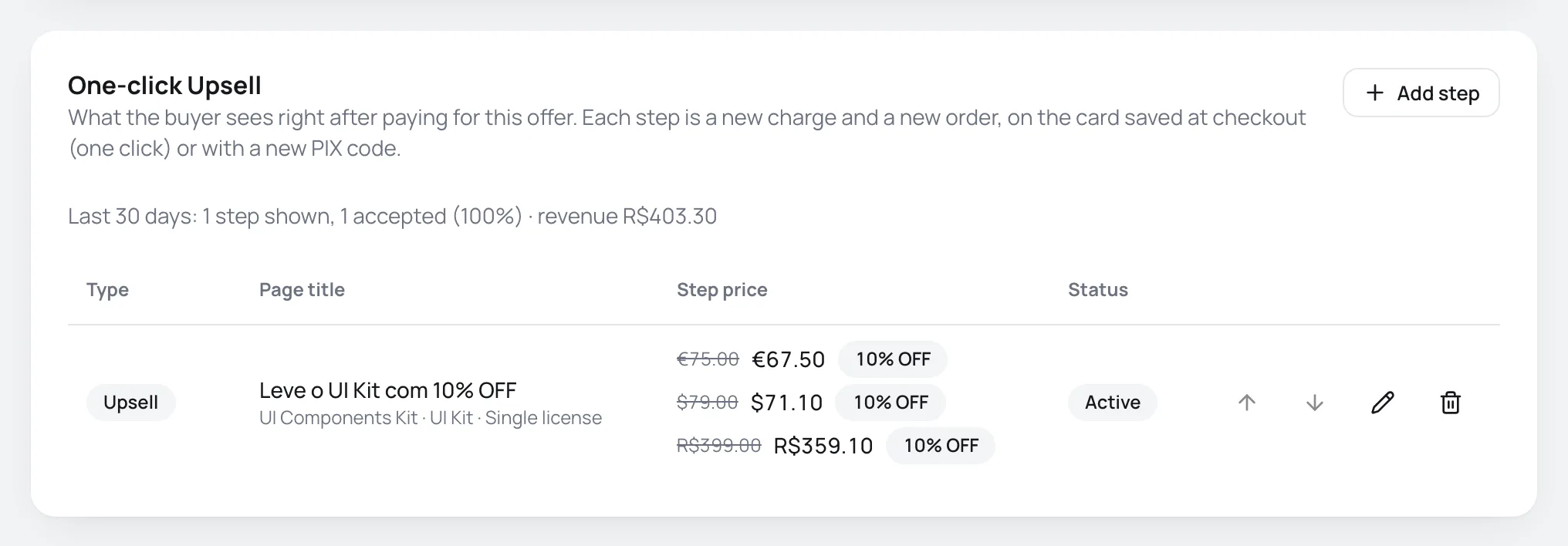
The card lists the steps in the order they show. Use the arrows to change the order. Each row shows the type, the title, the Step price in each currency and the Status. Above the list, the last 30 days summary shows how many steps were shown, how many were accepted, the rate and the revenue.
The sequence of steps
The buyer goes through the steps like this:
- Upsells always show, in list order.
- A downsell only shows when the step right before it was declined.
- Accepting a step skips the downsells that come right after it.
- After the last step, the buyer goes to the thank-you page, which also lists what they bought in the funnel.
Example with three steps:
| Order | Step | Who sees it |
|---|---|---|
| 1 | Upsell: kit with 6 jars for R$ 297 | Every buyer |
| 2 | Downsell: 3 jars for R$ 147 | Those who declined the 6-jar kit |
| 3 | Upsell: recipe e-book for R$ 27 | Every buyer, after the previous steps |
How the buyer buys in the step
- Paid by card: the page shows the purchase card and, in Brazilian reais, the installments from the store's rule. When they accept, Vipter charges that card right away, without asking for the details again.
- Paid with PIX: the page shows after the main purchase's PIX is confirmed. When they accept, the buyer generates a new PIX, with the purchase's CPF (Brazilian individual taxpayer ID) already filled in.
- Declined: the page leads to the next step or to the thank-you page.
Each step charges only once. Reloading the page or going back in the browser never creates a second charge. Each step's link is valid for 30 minutes.
When the step offers PIX instead of one click
The one-click charge depends on the card having been saved in the main purchase. For one-time purchases, the checkout asks to save the card when the offer has an active step. For subscriptions, the card is already saved for renewals. The step offers PIX when:
- the buyer paid the main purchase with PIX;
- the card payment went under review;
- the provider that charged didn't save the card. The main purchase is never lost because of this: Vipter charges again without saving the card.
Tell the buyer about the saved card
For one-time purchases, the checkout doesn't show a notice that the card is saved for the following offers. For subscriptions, it does. Card network rules require the cardholder to know what the card is saved for. State in the terms on your sales page that offers right after the purchase may be charged to the same card with one click. This helps you defend a dispute.
Each step's order
Each accepted step becomes its own order, linked to the main purchase, in the same currency. It's handled like any paid sale: it triggers the invoice, the member area, automations, pixels and webhooks. The sale keeps the same seller as the main purchase.
The step has no:
- Shipping: the step price is what the buyer pays. A product with delivery sold in the funnel goes out without a shipping calculation.
- Coupon: the funnel doesn't accept coupons.
Edit or delete
On the One-click Upsell card, the pencil opens the step and the trash can deletes it. Deleting asks for confirmation, and orders already placed don't change.
Common problems
-
Create another one-time offer to sell in the funnel.
The add button stays disabled until the store has another one-time offer.
-
Subscriptions cannot be sold in the funnel: pick a one-time offer.
Pick a one-time offer. Subscriptions only start through the checkout.
-
A funnel can have up to 4 steps.
Delete or replace one of the steps.
-
The buyer went straight to the thank-you page
Check that some step has Show after the purchase on and that the offer sold isn't archived.
-
The step asked for PIX from someone who paid by card
The card wasn't saved in the main purchase. Check that the card provider has One-click upsell in green and that the payment didn't go under review.
What to do next
- See what the thank-you page looks like after the funnel.
- Test the store by making a purchase through the funnel from start to finish.