Past-due payment and blocked sales
What happens when the plan's monthly fee or an overage charge is declined, when sales get blocked and how to settle it.
The plan's monthly fee and the quota overage are charged to the card registered when you subscribed to the plan. When that card declines, the store becomes past due. Vipter shows a notice at the top of the dashboard, keeps trying and, for overage, only blocks sales after several declines.
The stages
| Stage | When | What the store does | What you see |
|---|---|---|---|
| Up to date | Everything paid | Sells and creates items normally | Nothing |
| Past due | The monthly fee or an overage charge was declined | Keeps selling, and subscriptions keep renewing. Creating new items, such as products, offers and customers, is paused | There is a payment issue with your Vipter plan. Creating new items is paused until it is resolved. banner |
| Selling blocked | Five attempts to charge the same overage were declined | The checkout stops accepting new purchases. The dashboard stays open | Selling is paused: an overage charge is open. Update the card to sell again. banner |
| Suspended | The plan was cancelled or expired without payment | The dashboard becomes read-only, payment links and the customer portal go offline | This project is suspended. The dashboard is read-only and checkout links are disabled. banner |
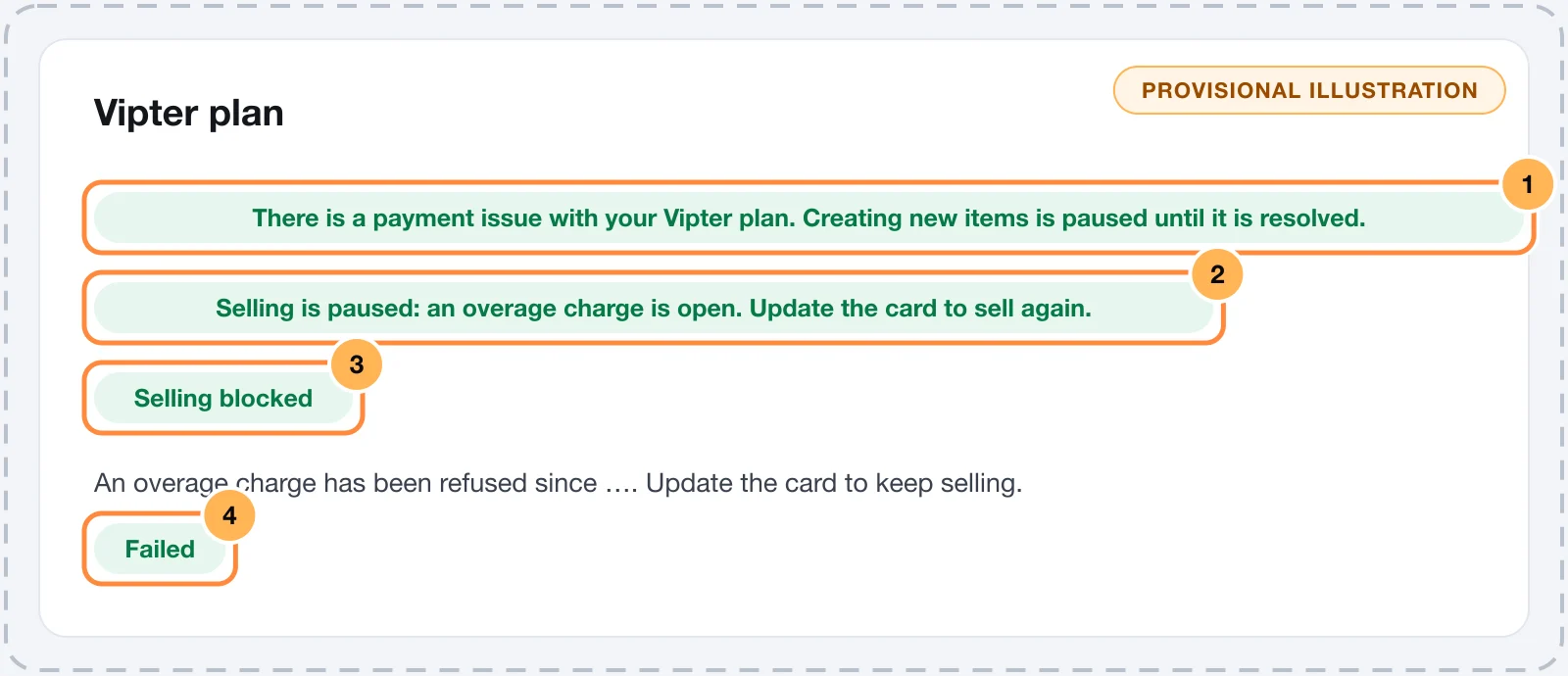
The banners show for the whole team. The Manage billing link, which opens Vipter plan, only shows for owners and admins.
Monthly fee declined
When the plan's monthly fee doesn't go through, the plan subscription goes into pending collection and the store becomes Past due. The Vipter plan page shows Payment failed since 09/20/2026. Update your card to keep the project active.
The payments platform tries the charge again. If the plan is cancelled for non-payment, the account's stores become Suspended.
Overage declined
When an overage charge is declined:
- The store becomes Past due right away and keeps selling. The plan page shows An overage charge has been refused since 09/20/2026. Update the card to keep selling. and the charge shows with the Failed status, with the decline reason.
- Vipter tries again every 6 hours.
- After 5 declined attempts, about a day after the first, sales stop. The plan page gets the Selling blocked badge, and payment links show buyers the link unavailable page.
Even with sales blocked, renewals of the subscriptions you already have keep being charged, and the dashboard stays open so you can follow orders and customers.
How to settle it
The dashboard has no button to change the plan's card. To change the card on file, contact support.
- Check the decline reason in the Overage charges table or in Billing history, in Vipter plan.
- If the problem is the card (limit, expiry, bank block), sort it out with the bank or contact Vipter support to register another card.
- Before the block, the next automatic attempt charges again. After the block, the automatic attempts are over: contact Vipter support to have the charge made again.
- When the account owes nothing more, the banner disappears and the store goes back to Active on its own, with sales unblocked.
It worked if
The banners at the top disappear, the charge shows as Charged and the payment link opens the checkout again.
Common problems
-
Creating new items is paused until the plan payment is resolved.
The store has a pending payment and can't create new products or offers. Settle the plan as described above.
-
The buyer sees that the payment link is not available
If the Selling is paused: an overage charge is open. Update the card to sell again. banner shows in the dashboard, sales are blocked by the unpaid overage. If it doesn't, the problem is with the offer: see Create an offer.
-
I have the Sales role and see the banner, but not the link
Only owners and admins open the plan. Let the store's owner know.
What to do next
- Understand how overage is calculated in Order quota and overage.
- See the plans in Plans and limits.
Order quota and overage
What counts as an approved order in the plan's quota, how overage is charged in blocks of 50 and what the quota notice banners mean.
Profile, language and theme
Change your name, your photo, the dashboard language, the password and the light or dark theme of your Vipter account.