Abandoned checkouts
See who filled in the checkout and left without trying to pay, read the recovery numbers, open each record and copy the recovery link.
The Abandoned checkouts tab lists people who started a purchase, left their name and e-mail in the checkout and left without trying to pay. It sits in SalesTransactions, next to All transactions. Every team role sees the tab.
This page explains the screens. To learn how Vipter detects abandonment, when it notifies your automations and how it avoids sending a discount to someone who already bought, see Recover abandoned checkouts.
What counts as abandoned
A checkout becomes abandoned when the buyer filled in the contact details, made no payment attempt and stayed inactive for 15 minutes. These are left out:
- declined card: there was an attempt, so it is a Failed order in All transactions;
- PIX (Brazilian instant payment) or boleto (Brazilian bank payment slip) generated and not paid: there was also an attempt, so it is a Pending order.
An abandoned checkout never becomes an order and does not show in the transactions list.
If the same buyer abandons the same product more than once, Vipter keeps a single record and adds up the attempts. Different offers of the same product, such as monthly and yearly, and plans in the same family also count as one record.
Records are deleted after 30 days.
The list
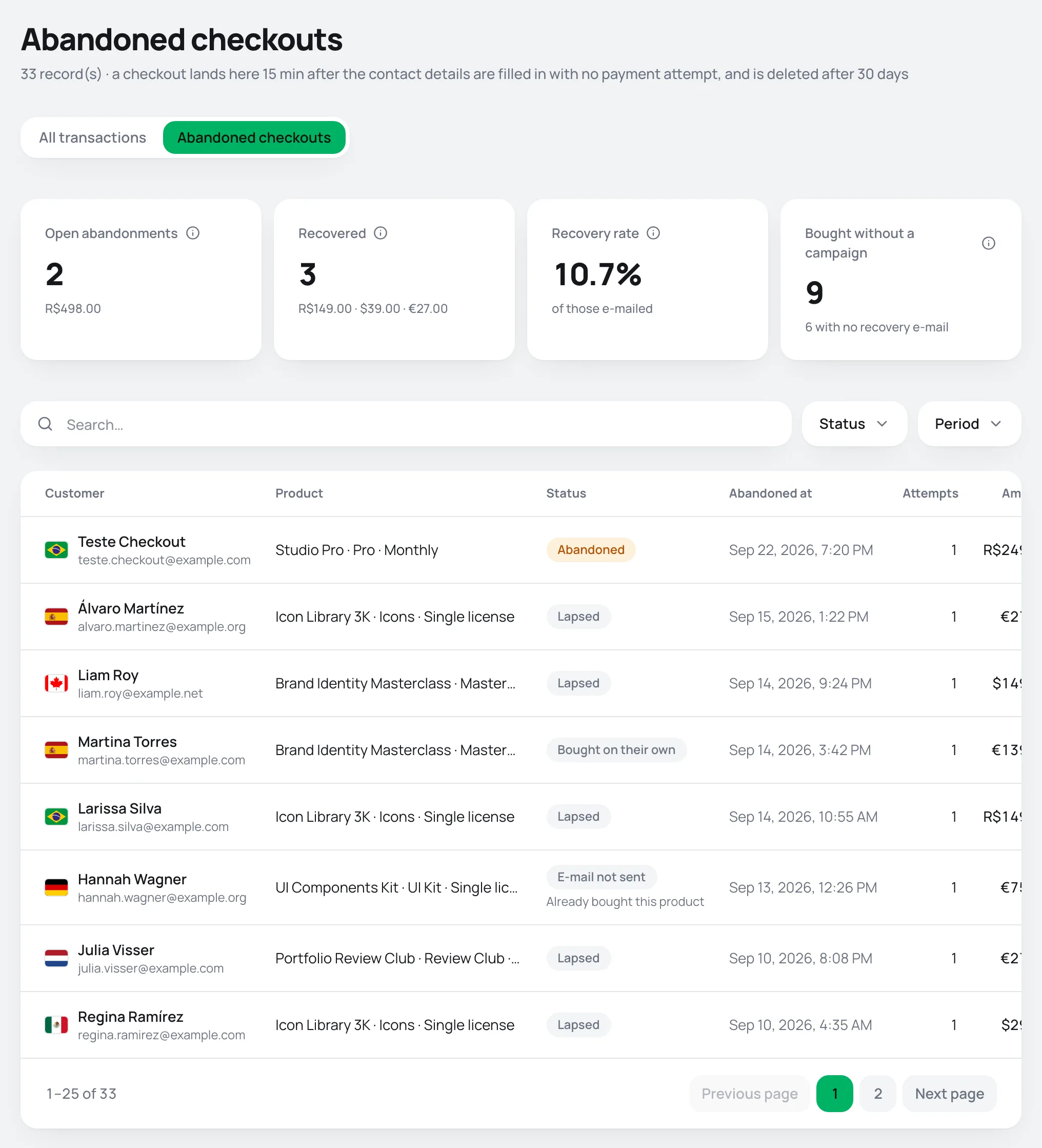
The indicators
| Indicator | What it shows |
|---|---|
| Open abandonments | Records still open, with the amount added up per currency. |
| Recovered | Buyers who bought after the abandonment notice went out to your automations, with the amount per currency. Only these count as recovery. |
| Recovery rate | Recovered ÷ records whose notice went out. People who came back and bought before the notice are left out, so the rate is not inflated. |
| Bought without a campaign | People who came back and bought before the notice went out, plus those who got no notice because they had already bought. Below it, how many got no notice. |
The indicators follow the period filter. The search and the status filter don't change the numbers.
Search and filter
- Search: by the buyer's name or e-mail, or by the product or offer name.
- Status: one of the statuses in the table below.
- Period: by the abandonment date.
The columns
| Column | What it shows |
|---|---|
| Customer | Country flag, the buyer's name and e-mail. |
| Product | Product and offer of the latest attempt. |
| Status | The record's status and, when the notice was not sent, the reason. |
| Abandoned at | When the checkout was considered abandoned. |
| Attempts | How many times the buyer opened and filled in the checkout for that product. |
| Amount | The offer's amount in the latest attempt. |
The statuses
| Status | What it means |
|---|---|
| Abandoned | Open: the buyer has not bought yet. Only this status has a recovery link. |
| Recovered | Bought after the abandonment notice went out. |
| Bought on their own | Came back and bought before the notice went out. No notice was sent. |
| E-mail not sent | The notice did not go out, on purpose. The reason shows below the status: Already bought this product (in the last 30 days), Already has an active subscription or Team e-mail, when the e-mail belongs to someone on the project's team. |
| Lapsed | 7 days went by with no purchase. The record leaves the open ones and the recovery link is no longer generated. |
A record's detail
Click the buyer's name to open the record.
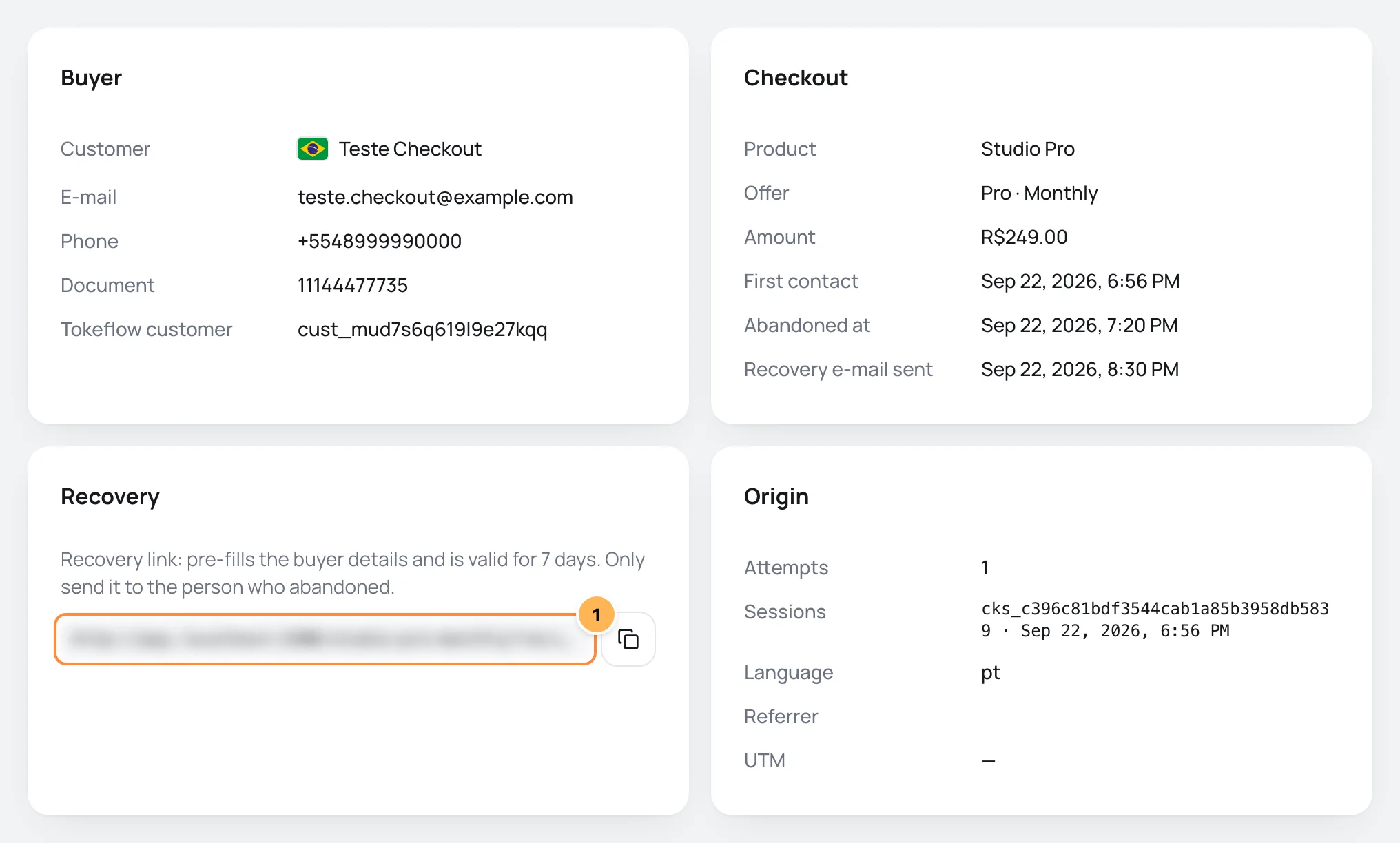
- Buyer: the name, e-mail, phone and document the buyer typed. If they are already a store customer, Tokeflow customer leads to the customer's page.
- Checkout: product, offer, amount, First contact and Abandoned at. The Recovery e-mail sent row shows when the abandonment notice went out to your automations and webhooks, or E-mail not sent yet. Vipter does not send recovery e-mails on its own: the message is sent by the tool that gets the notice. When the buyer clicks the recovery link, Link clicked shows. When they buy, Order leads to the order.
- Recovery: the recovery link, with the copy button.
- Origin: the Attempts, the codes of the checkout Sessions, the checkout's Language, the Referrer page and the link's UTM parameters.
The recovery link
- Open a record with status Abandoned.
- On the Recovery card, click the copy button next to the link.
- Send the link only to that buyer, for example on WhatsApp.
The link opens the checkout for the same offer with the buyer's details already filled in and is valid for 7 days. It does not store any payment: the buyer chooses how to pay and pays from scratch. When the record closes, because the buyer bought or because the 7 days went by, the card shows This record is closed, so no recovery link is generated any more.
The link fills in personal data
Whoever opens the link sees the buyer's details already filled in on the checkout. Send the link only to that person.
Common problems
-
No abandoned checkouts in this period.
Nobody abandoned the checkout in the period, or the abandonments have not reached 15 minutes yet. A checkout only shows here 15 minutes after the contact details are filled in with no payment attempt. Records older than 30 days are deleted.
-
A buyer whose card was declined does not show.
There was a payment attempt, so it is a Failed order in All transactions, not an abandoned checkout.
-
The record says E-mail not sent yet for more than an hour.
The notice goes out one hour after the abandonment, if nobody bought in the meantime. If the status is E-mail not sent or Bought on their own, the notice does not go out on purpose. See Recover abandoned checkouts.
What to do next
- Turn on an automation that gets the abandonment notice and sends the recovery message. See Automations.
- Get the notices in your own system with Webhooks.
Change the status manually
Mark an order settled outside the checkout as paid, canceled or refunded, with the reason on record, and learn what each status triggers and which status wins when the provider changes it later.
Subscriptions: lifecycle and statuses
Follow the store's subscriptions, understand each status, how renewals, free trials, cycle limits and declined charges work, and what the subscriber receives.