Connect Taboola
Send checkout visits and purchases to Taboola, through the pixel in the browser and by server postback when the buyer comes from an ad with tblci.
With Taboola connected, the Taboola pixel fires on the checkout and the thank-you page. When the buyer arrives from a Taboola ad, the address carries the click identifier (tblci), and Vipter also notifies Taboola from the server. This notification needs no token and counts the sale even if the buyer pays the PIX (Brazil's instant payment) after closing the page.
Before you start, it helps to read how conversion tracking works.
Before you start
- An advertiser account in Taboola (Realize) with access to the Tracking area.
- The Admin or Owner role in the Vipter project.
- At least one product created in Vipter.
Step 1: prepare the account in Taboola
- In Realize, choose the account that runs the campaigns and open Tracking in the side menu. Copy the Account ID, the number shown at the top.
- Still in Tracking, create one conversion per event you want to measure: click + New Conversion, choose to create the conversion with code and the EVENT type. Use exactly the names in the table at the end of this page, such as
make_purchasefor the purchase. With any other name, Taboola doesn't recognize the event. - Check that the campaigns carry the click identifier. Taboola adds
tblci={click_id}to ads by default; if your account uses another name, change it totblciin the campaign's tracking area.
Step 2: connect the account in Vipter
- In the Vipter dashboard, open GeneralConversionsAccounts and click Connect account. Choose Taboola Ads.
- Fill in the numbered fields. Taboola doesn't use a token.
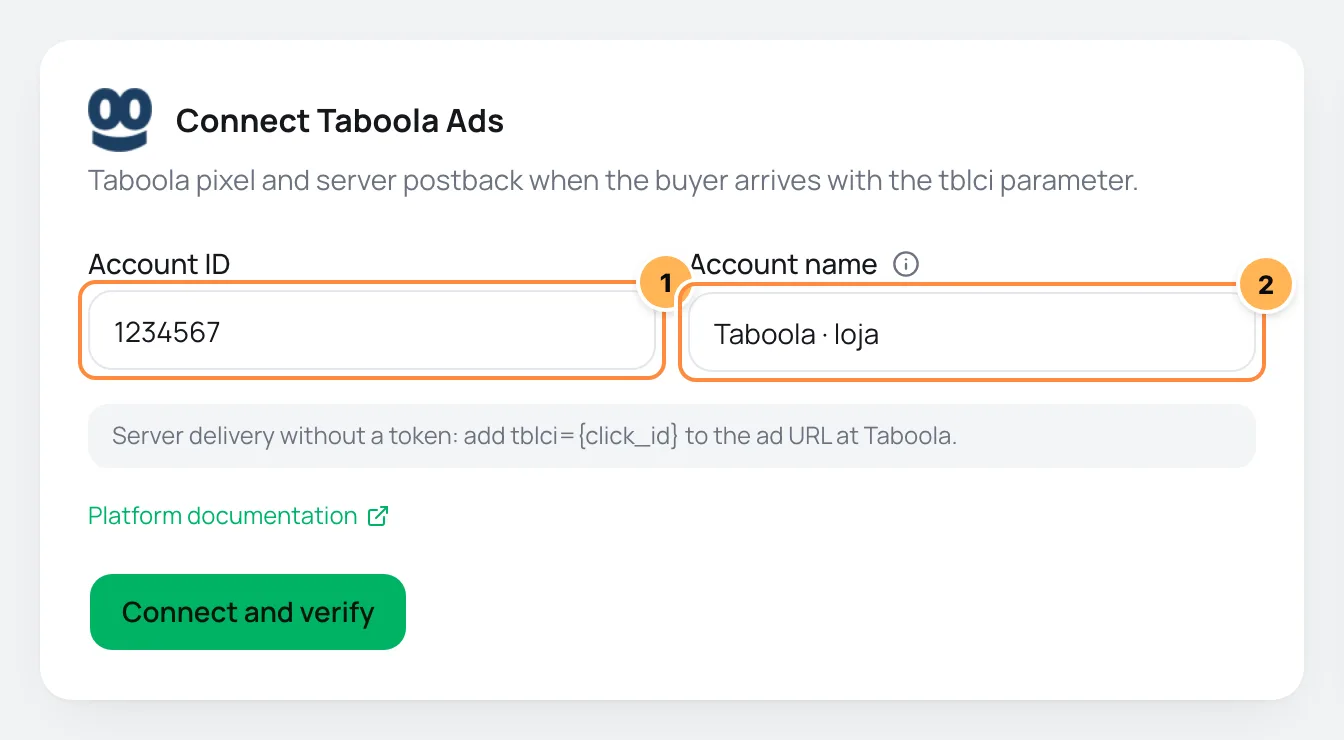
| # | Field | What to paste |
|---|---|---|
| 1 | Account ID | The Account ID from step 1. Numbers only. |
| 2 | Account name | A name to recognize the account, such as "Store Taboola". If left blank, it is "Taboola Ads". |
- Click Connect and verify and then Continue.
- Check the products the pixel should fire on and click Finish. Turn on Use automatically on new products to include products created later.
Postback counts toward your plan
Every Taboola account sends from the server, so it counts toward your plan's limit of accounts with server delivery.
Step 3: test
Taboola has no test event. The account shows Browser + postback and the verification completes on its own:
- Open the account in Accounts, on the Connection tab, and click Verify now.
- After the first buyer fills in their details on the checkout, the list shows the first event received.
- After the first sale from a Taboola ad, the list shows the first sale sent from the server.
It worked if
The verification shows ID in the expected format, the first event and the first sale sent from the server, and the make_purchase conversion shows in Taboola's Tracking.
What Vipter sends to Taboola
| Event in Vipter | Name in Taboola |
|---|---|
| Page view | page_view |
| Checkout started | start_checkout |
| Lead (contact filled) | lead |
| Payment started | add_payment_info |
| PIX generated | pix_generated |
| Purchase | make_purchase |
| Subscription started | subscribe |
- From the browser, every event that is on goes out. From the server, Lead (contact filled), PIX generated, Purchase and Subscription started go out, and only when the buyer arrived with
tblci. - Events carry the value, the currency and, when there is an order, the order ID.
- Taboola doesn't receive Shipping chosen, Renewal or Refund / chargeback.
- In What to send, choose the events, the Conversion value and the Value currency. See events and values.
Common problems
-
Server delivery only happens when the ad brings its click identifier; without it, a PIX paid after the page was closed is not counted.
The ad leads to a sales page and the
tblcigets lost on the way to the checkout. Paste the UTM script on the sales page: it passes thetblcion to the checkout. -
Sales reach Vipter but don't show in Taboola
The conversion doesn't exist in Taboola or has another name. Create the EVENT conversion with the exact name from the table, such as
make_purchase. -
A sale has no server delivery in the activity
Sales without
tblcigenerate no postback and no server row in Activity. This is expected for buyers who didn't come from a Taboola ad. -
Your plan does not allow another account sending from the server. Upgrade to connect one more.
Your plan reached its limit of accounts with server delivery. Delete an account with server delivery that you no longer use or change plans in Vipter plan.
What to do next
- Paste the UTM script on your sales page.
- Also connect Outbrain.
Connect Google Tag Manager
Load your GTM container on the checkout and receive purchase events in the dataLayer, using the GA4 e-commerce standard, to fire your own tags.
Connect Outbrain
Send checkout visits and purchases to Outbrain, through the pixel in the browser and by server postback when the buyer comes from an ad with ob_click_id.