Several stores in the same account
Switch stores with the selector, create another store and understand how a new store uses the account's same plan, quota and seats.
Each Vipter project is a separate store, with its own catalog, customers, orders, payment connections, settings and team. You can have several stores in the same account and be on the team of other people's stores. The plan, however, belongs to the account: one subscription covers all the stores you own.
Switch stores
Click the store's name, in the top left corner of the screen. The list shows all the stores you're in, with a search at the top.
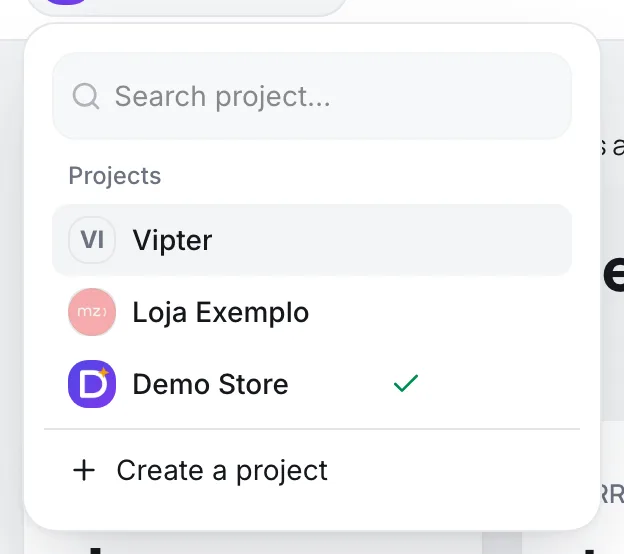
When you switch, Vipter tries to open the same section in the other store: if you were in Transactions, it opens Transactions of the other store. On a record's page, such as an order or a product, it opens the other store's home dashboard.
To see all stores as cards, with each one's currency, country, your role and status, use Projects in your profile picture menu. The same page shows pending invitations for your e-mail, with the Join button.
Create another store
Before you start
- Own fewer stores than the plan allows. See the limit below.
- The new store's details: name, country, currency, time zone and contact.
- In the store selector, click Create a project. Or, in Projects, click New project.
- Fill in the Create a new project screen. The fields are the same as for the first store: see Create the first project.
- Click Create project.
The new store uses the plan the account already has, and provisioning starts on its own within a few minutes. You don't pay again. Provisioning is the same as for the first store: see Choose the plan and activate the account.
It worked if
The new store's dashboard opens, and it shows in the store selector.
What the account shares between stores
| Item | How it counts |
|---|---|
| Plan and monthly fee | One for all the stores you own. |
| Order quota | Adds up the approved orders of all your stores. See Order quota and overage. |
| Stores | The plan limits how many stores you can own. |
| Seats | Add up the people in all your stores. Someone in two of your stores takes only one seat. |
| Payment connections and server-side tracking | Counted per store, each with the plan's limit. |
Stores where you are on someone else's team don't count toward your plan: they count toward their owner's plan.
How many stores each plan allows
| Plan | Stores |
|---|---|
| Lite, Start and Grow | 1 |
| Pro | 3 |
| Max | 10 |
Values as of September 2026. Without a plan, the account can have one store, which is where you choose the plan. Stores run by Vipter itself and demo stores don't count. See all the limits in Plans and limits.
Common problems
-
Your plan covers 1 store(s). Upgrade to create another.
You already own the number of stores the plan covers. Switch to a plan with more stores in Vipter plan.
-
The new store is stuck in provisioning
Provisioning starts on its own within a few minutes after the store is created. If it doesn't finish, see what to do in Choose the plan and activate the account.
-
A store doesn't show in the selector
You are not on its team, or the invitation hasn't been accepted yet. See pending invitations in Projects.
What to do next
- Invite each store's team in Team and invitations.
- Compare the plans in Plans and limits.
Profile, language and theme
Change your name, your photo, the dashboard language, the password and the light or dark theme of your Vipter account.
How to pay: card, installments and PIX
For people buying from a store that uses Vipter. See how to fill in your details, pay by card, split into installments and pay with PIX.