Thank-you page and success URL
What the buyer sees after paying, how downloads show up and how to send the buyer to a page of yours with the success URL.
After paying, the buyer lands on your store's thank-you page, with your brand. It confirms the payment, shows the order and the files to download and, if you want, takes the buyer to a page of yours after a few seconds.
The path after the payment
- Post-purchase offers: if the offer has steps in One-click Upsell, the buyer sees each one right after paying. See One-click upsell.
- Thank-you page: shows when the buyer finishes the post-purchase offers, or right away if there are none.
- Success URL: if you set one, the thank-you page takes the buyer there.
With PIX, the buyer only moves on when the payment is confirmed. With a card under review, the checkout waits for the bank's answer and moves on by itself when the payment is approved.
What the page shows
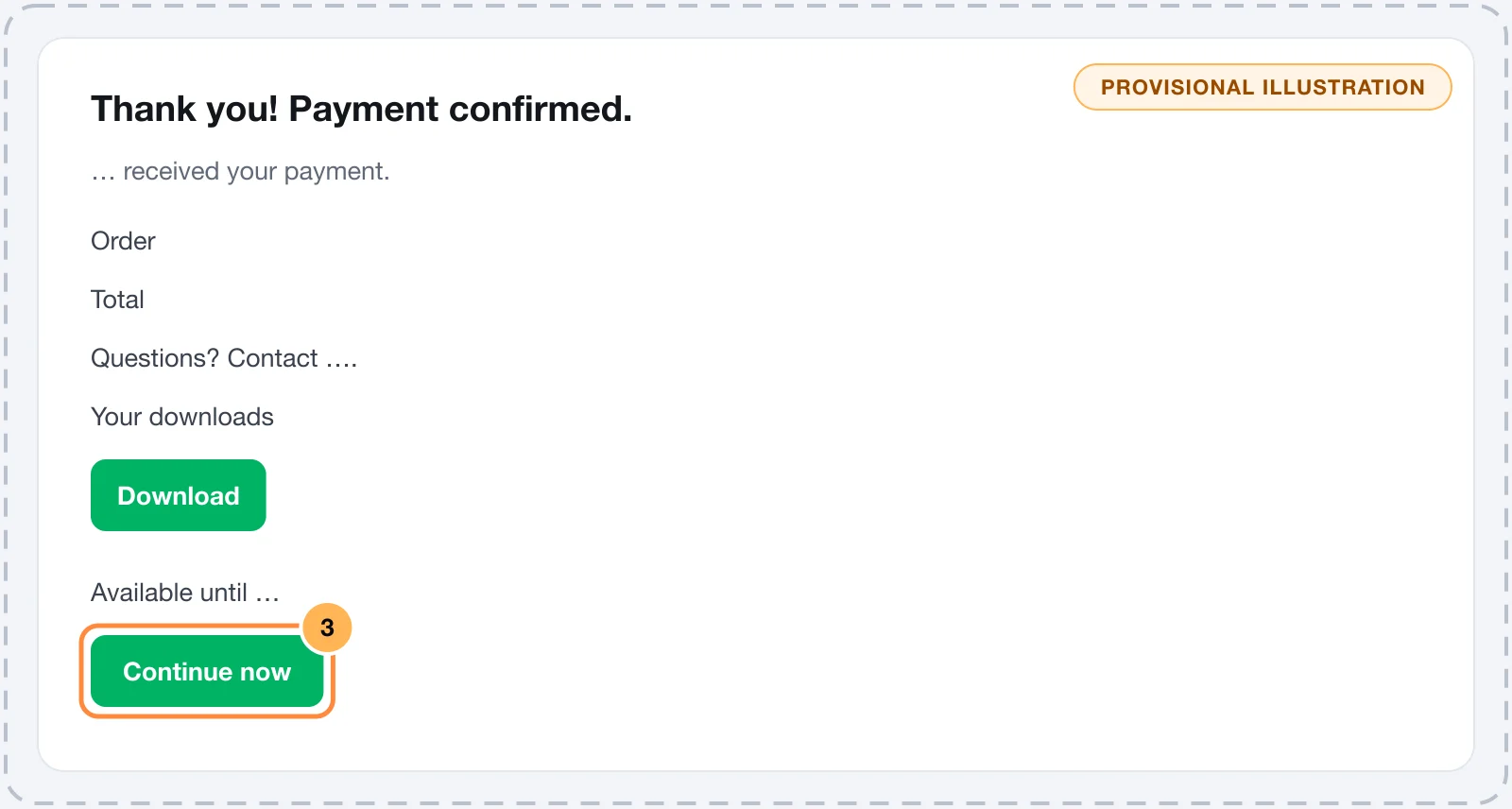
- The title: what you wrote in Thank-you page title or, if empty, the default payment-confirmed message, in the buyer's language. See Branding: logo, colors, titles and social preview.
- The confirmation: the store name and the notice that it received the payment. The page only says a confirmation e-mail will be sent when the store has an active e-mail provider and the order-confirmed e-mail turned on. See E-mails to buyers.
- The order: the product image and name, the order bump items with a "+" in front, the order number and the total.
- Accepted post-purchase offers: each one is a separate order, with its own number and amount, and the page adds up the total paid. A post-purchase offer PIX that hasn't been paid yet shows as awaiting payment and is left out of the sum.
- Support: the sentence "Questions? Contact" followed by the store's Support email, when it is filled in at GeneralSettingsGeneral.
- Downloads: the files of the product and of each order bump, with the download button and the deadline, when there is one. See the next section.
If the payment hasn't been confirmed yet when the page opens, it shows "Almost there…" and updates by itself when the confirmation arrives.
Downloads on the thank-you page
Download links only show in the browser that made the purchase. Anyone who opens the thank-you page address on another device sees a notice that the links were released to the buyer, with the way to the customer area, if it is active.
With the customer area active, the page reminds the buyer that the links are also there and shows the "Open my account" link. The files, the download limit and the deadline are set in the product's Downloads tab. See Files for download.
Send the buyer to a page of yours
The success URL takes the buyer, after the payment, to a page of yours: a WhatsApp group, the member area, a welcome page.
It can be set in two places. The first one filled in applies:
- Success URL (redirect after payment), on the offer page. See Create an offer.
- Default success URL, in the Checkout card of GeneralSettingsGeneral. It applies to all offers that don't have their own URL.
How the buyer gets there:
- No files to download: the thank-you page counts down 30 seconds, with the notice "Redirecting in…", and opens the URL. The "Continue now" button opens it right away.
- With files to download: the page doesn't redirect by itself, so the buyer has time to download. It only shows the "Continue now" button.
The redirect only happens with the payment confirmed. Vipter opens the URL exactly as you entered it, without adding parameters.
The purchase event fires on the thank-you page
Buyers who go to the success URL have already gone through the thank-you page, which records the purchase in the store's conversion pixels. You don't need another purchase event on your page. See Conversion tracking.
Test
- Make a test purchase. See Test your store.
- Check the title, the order number and the support e-mail on the thank-you page.
- If the product has files, click one of them to check the link.
- With a success URL, wait the 30 seconds or click "Continue now" and confirm the destination address.
Common problems
-
The thank-you page doesn't redirect
The offer has files to download, and in that case only the "Continue now" button shows. Or no success URL is filled in, neither on the offer nor in the store settings.
-
The buyer says they didn't see the downloads
They opened the thank-you page in another browser or device. The links are in the customer area, in the confirmation e-mail when the store sends e-mails, and in the order's downloads card in the dashboard, where you can resend them.
-
The page doesn't show the support e-mail
The store's Support email is empty. Fill it in at GeneralSettingsGeneral.
What to do next
- Sell more right after the payment with the One-click upsell.
- Set up the product's files for download.
Accept PIX
Turn on PIX at checkout, see what the buyer receives and understand when the order becomes paid and what happens when the code expires.
Abandoned checkout recovery
Understand when a checkout counts as abandoned, when Vipter notifies your automations, how the recovery link works and how long the data is kept.