Commissions and seller links
Follow each seller's sales and commissions, share links that attribute the sale and understand how the commission is calculated and reversed.
A seller is a member of the store's team with their own code. A sale made through their link, or charged by them in the dashboard, is credited to them with the commission calculated at the time of the sale. On the Commissions page, each seller follows their own numbers, and the admin follows everyone's.
The admin is the one who sets up sellers, codes and commission rules. See Sellers and commission rules.
Before you start
- Sellers set up by the admin, each with a code and a commission rule, their own or the store's default.
- Any project role opens the page. The Sales role sees only their own numbers. Admin and Owner see every seller.
What the admin sees
Open SalesCommissions. Pick the period at the top: 7 days, 30 days, 90 days, Month to date or Year to date. Amounts are in the store's currency, and a sale falls in the period by the date it was paid.
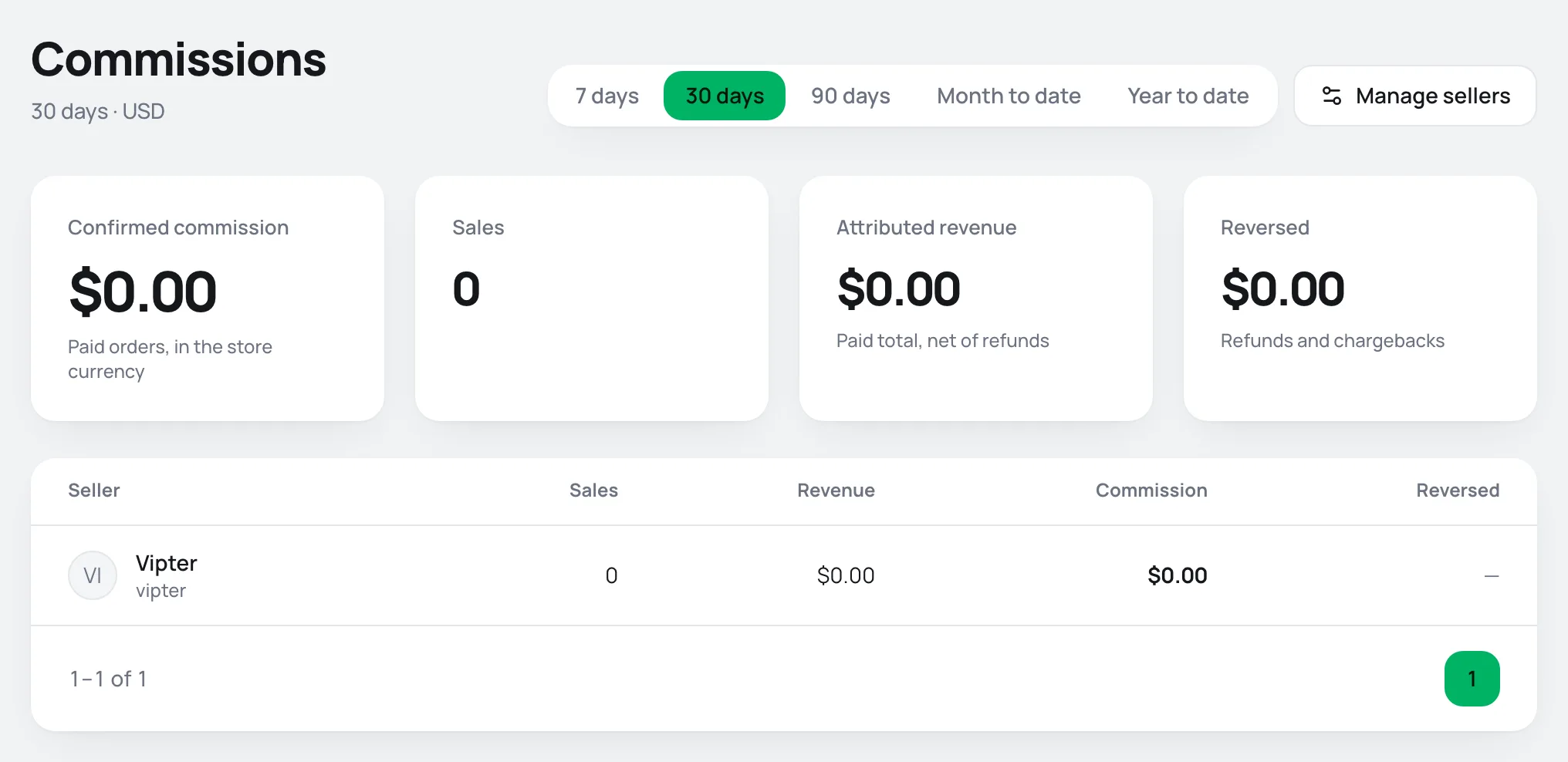
| Indicator | What it adds up |
|---|---|
| Confirmed commission | The commission on orders paid in the period, with the refunded part already taken out. |
| Sales | How many of the sellers' sales were paid in the period, including those refunded later. |
| Attributed revenue | The total paid on the sellers' sales, with refunds already taken out. |
| Reversed | The commission lost to refunds and chargebacks. |
Below, the list shows each seller with Sales, Revenue, Commission and Reversed, from highest to lowest earner. A seller whose code is deactivated shows with the Inactive badge. Someone removed from the sellers stays on the list while they have sales in the period, marked Not a seller.
Click a seller to see their sales, just as they see them. The Manage sellers button leads to the sellers setup.
What the seller sees
With the Sales role, SalesCommissions opens straight to My commissions, with the same four indicators, only for their own sales.
The Sales in the period card lists the sales paid in the period:
| Column | What it shows |
|---|---|
| Date | The payment date. |
| Customer and Order | Who bought and the order code. Click it to open the order. |
| Source | How the sale reached the seller. See the table in the next section. |
| Status and Total | The order's status and total. |
| Commission | The commission. In grey when it is not confirmed yet. Below it, with a minus sign, the reversed part. A dash when there is no commission rule. |
My links
Next to it, the My links card has a payment link for each active offer in the store, with the seller's code already at the end, such as pay.vipter.com/curso?v=ana. If the store has a custom domain, the links use that domain. Click the copy button and share.
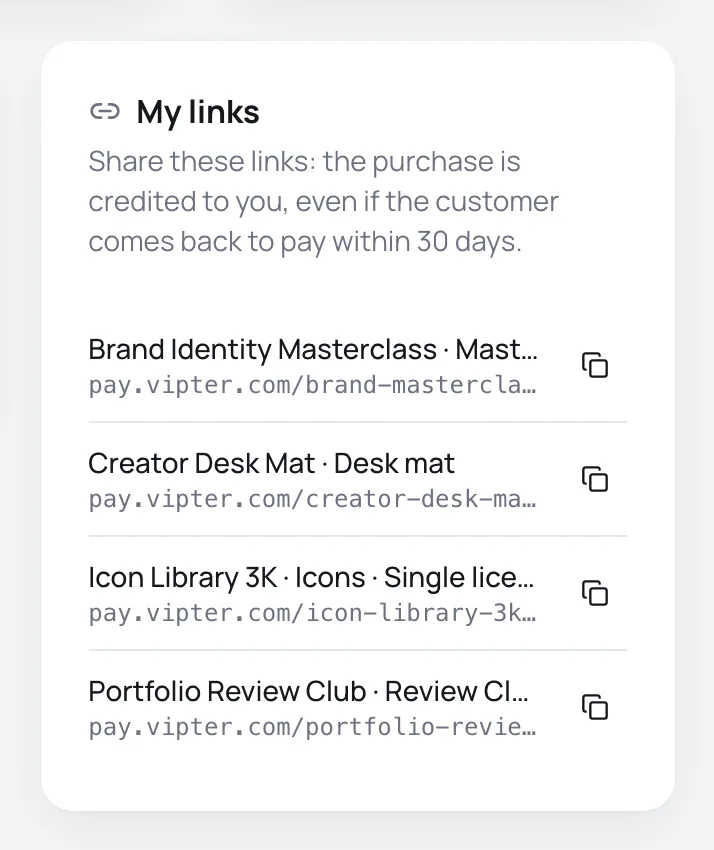
The sale is credited to the seller even if the customer comes back to pay within the next 30 days, on the same browser. If the customer opens another seller's link later, the sale goes to the last link opened.
The code also works on any payment link of the store: add ?v= and the code, or &v= if the link already has other parameters. With the UTM script installed on the website, the seller can share the sales page with ?v= instead of the checkout, and the code carries through to the checkout. See Payment link and URL parameters.
The card only shows when the seller's code is active.
How an order gets a seller
Each order has at most one seller. The source shows in the Source column and on the Seller card of the order's page:
| Source | When |
|---|---|
| Link | The checkout was opened with an active seller's code, or with a code the customer's browser remembered from the last 30 days. |
| Dashboard sale | Someone on the team charged through New sale on the saved card. The order goes to whoever clicked. |
| Upsell | The customer accepted a one-click upsell offer. The order goes to the seller of the main purchase. |
| Renewal | A subscription renewal, only if the store turned on Pay commission on subscription renewals. The order goes to the seller of the first charge. |
| Manual | An admin chose, changed or removed the seller on the order's page. That choice is final: nothing automatic changes the seller afterwards. |
An admin fixes the seller of any order on the Seller card, with Assign or Change. See Order detail. In SalesTransactions, the Seller filter shows one seller's orders.
How the commission is calculated
The rule in effect is the one at the moment the order gets a seller:
- The rule is the seller's or, if they have no rule of their own, the store's Default rule. With neither, the order goes to the seller with no commission.
- Percentage of the products: the percentage applies to the product amount, which is the total paid minus shipping and installment interest. The coupon discount is already left out. A sale in another currency is converted to the store's currency before the calculation.
- Fixed amount per sale: the same amount per order, in the store's currency, whatever the quantity.
- A seller whose code is deactivated, or a team member who is not a seller, gets the sale with no commission.
The commission is frozen on the order, along with the rule used. Changing the rule later does not change earlier sales. When an admin changes an order's seller, the commission is recalculated with the new seller's current rule.
Refunds and chargebacks
The commission follows what happened to the order:
| Order status | Commission |
|---|---|
| Paid | Fully confirmed. |
| Partially refunded | Confirmed in proportion to what remained paid. The rest shows as reversed. |
| Refunded or Charged back | Fully reversed. |
| Pending | Does not count yet. On the order's Seller card, it shows as awaiting payment. |
The reversal is automatic: when the refund or chargeback reaches the order, the indicators and the list update. See Refund, capture and void.
Common problems
-
You do not have a seller code yet.
You are not set up as a seller. The sales you make in the dashboard already show here, without commission. Ask an admin to set up your code and your rule.
-
Your code is deactivated: the link is not crediting sales right now.
An admin deactivated your code. Sales made in the dashboard stay under your name, without commission. Ask for reactivation so the link works again.
-
A sale through my link was not credited to me
The code was deactivated or mistyped in the link, or the customer opened another seller's link after yours. A code that does not exist is recorded on the order's Source and conversions card, and an admin can assign the sale by hand.
-
The commission shows as a dash
The seller has no rule of their own and the store has no default rule. Setting up a rule now does not change earlier sales. An admin can reassign the order to the same seller to recalculate.
-
The sale does not show in the period
The page only counts paid sales, by payment date. A PIX (Brazilian instant payment) generated and not paid yet counts when it is paid.
What to do next
- Set up sellers and commission rules.
- Sell on a customer's saved card from the dashboard.