Product types
Learn what each product type changes in billing, address, shipping, downloads and invoices, and pick the right one.
Every product in Vipter has a type. The type decides four things: whether the sale is one-time or recurring, whether the checkout asks for a delivery address and offers shipping, whether the product can deliver files for download, and which invoice is issued by default.
You pick the type in the Product type field when you create the product. Right below the field, the dashboard sums up the chosen type and shows how it bills.
The six types
| Type | Billing | Delivery address and shipping | Downloads | Invoice |
|---|---|---|---|---|
| Physical product | One-time | Yes | No | NF-e |
| Digital product | One-time | No | Yes | NFS-e* |
| Course | One-time | No | Yes | NFS-e* |
| Physical subscription with delivery | Recurring | Yes | No | NF-e |
| Physical subscription without delivery | Recurring | No | No | NFS-e* |
| Virtual subscription (SaaS / platform) | Recurring | No | No | NFS-e* |
* Or the default invoice kind of the invoice integration, when one is set. NF-e is Brazil's electronic invoice for goods, and NFS-e is Brazil's electronic invoice for services.
Digital product and Course work the same way in Vipter. Choose Course when the buyer gets access to lessons, for example in a member area such as MemberKit, and Digital product for e-books, templates and other files.
What each characteristic changes
Billing
- One-time: the buyer pays once. These products accept coupons, packs (
?pack=), order bumps and PIX (Brazil's instant payment). - Recurring: the buyer subscribes and is charged every cycle, on the card. The offer sets the cycle, the trial period and the first charge. Subscriptions don't accept coupons, packs, order bumps or PIX.
Billing doesn't change once the product exists. When you edit it, the Product type field only lists types with the same billing: a Physical product can become a Digital product, but not a subscription. To switch from one-time to subscription, create another product.
Delivery address and shipping
For types with delivery, the checkout asks for the delivery address and shows the shipping options for that address. The product form gets the Shipping block, with weight, dimensions and Shipping class.
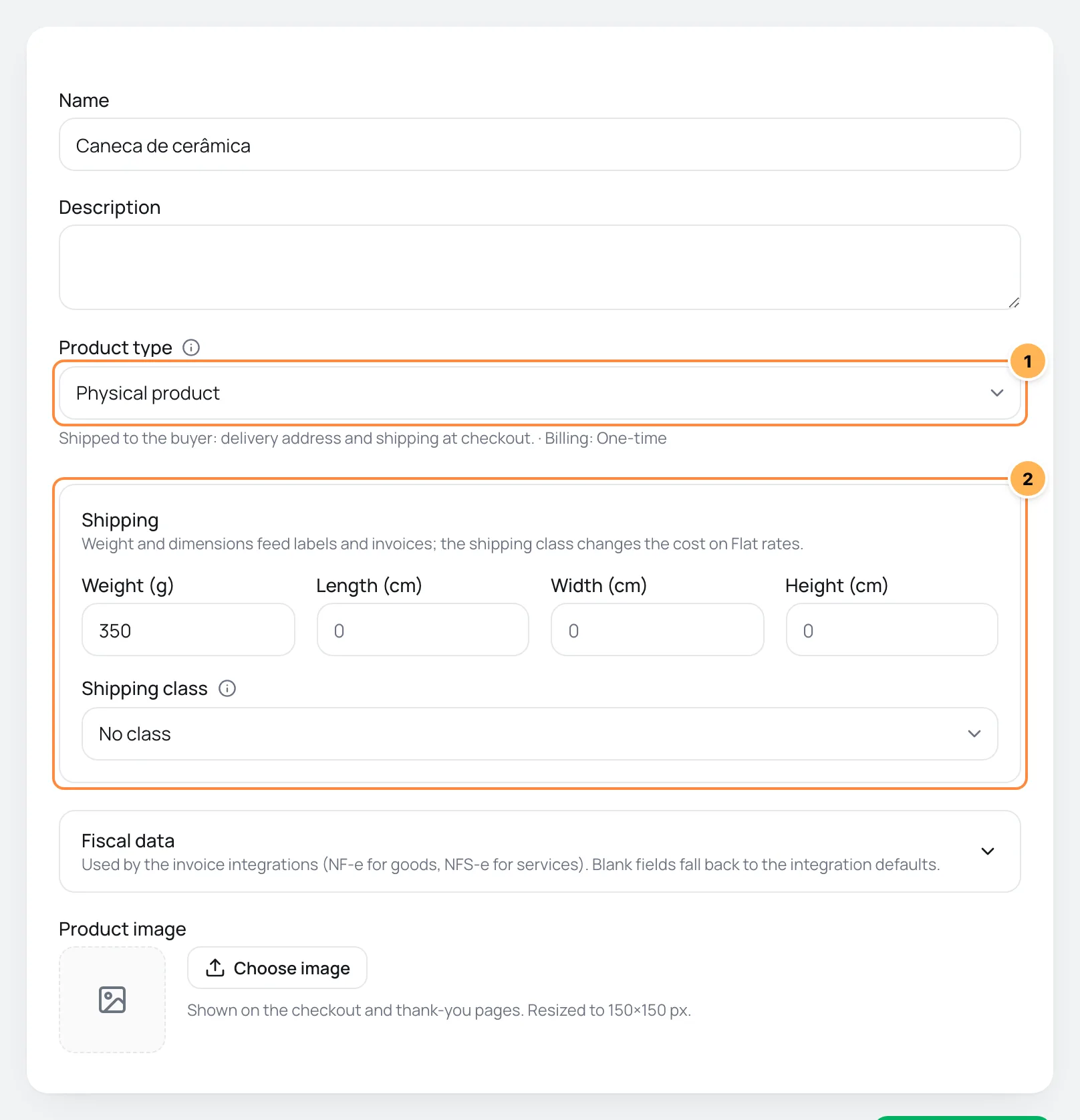
- The Physical product type selected.
- The Shipping block, which only shows for types with delivery.
For shipping to show at checkout, the store needs at least one active shipping method in CatalogShipping. Without one, the form warns you: No active shipping method: set up Shipping before selling this product.
Subscriptions with delivery only offer free shipping
A subscription is always charged at the plan price, so the checkout only lists shipping methods with no cost, such as free shipping or pickup. Include shipping in the offer price.
If the Ship to option in GeneralSettingsGeneral is set to Disable shipping & shipping calculations, no product asks for a delivery address or calculates shipping, whatever its type.
For types without delivery, the form shows the Ask for billing address at checkout switch. When it is off, the checkout doesn't ask for an address and Vipter sends the provider the Store address saved in the settings. When it is on, the buyer enters their billing address.
Downloads
Digital product and Course get the Downloads tab on the product page. There you add links to files you host. After payment, the buyer gets the links on the thank-you page and, depending on the store settings, in the customer portal and by e-mail.
Invoice
The type sets the invoice that invoice integrations issue: types with delivery always issue an NF-e. The others follow the integration's Default invoice kind and, without it, issue an NFS-e. The product's tax codes are in the Fiscal data section of the form, which changes with the type. See Create and edit a product.
How to choose
- Do you ship something once, by mail or carrier? Physical product.
- Do you ship something every cycle, like a subscription box? Physical subscription with delivery.
- Do you sell a file or access that is paid once? Digital product or Course.
- Do you charge every month for an in-person service, such as a gym or consulting? Physical subscription without delivery.
- Do you charge every month for access to a system or online content? Virtual subscription (SaaS / platform).
What to do next
- Create the product with the type you chose.
- Create an offer to get the price and the payment link.
Path to selling a subscription box
What to set up, and in what order, to sell a subscription with a delivery every cycle, such as a monthly box, with shipping built into the price.
Create and edit a product
Add what you sell with a name, type, image, address and fiscal data, and get to know the tabs on the product page.