Connect Reportana
Send PIX generated, payments, shipments with tracking, declined cards and abandoned checkouts to Reportana so it recovers sales and keeps the buyer informed.
With Reportana connected, Vipter creates and updates the store's orders and abandoned carts in Reportana. Reportana uses this data in its automations: reminding the buyer of the generated PIX (Brazil's instant payment), recovering the declined card and the abandoned cart, announcing that the order was paid and following the tracking.
Before you start, read how automations work.
Before you start
- A Reportana account with the store created.
- The Admin or Owner role in the Vipter project.
- The checkout asking for the buyer's phone and e-mail. Reportana requires both.
Step 1: copy the API credentials in Reportana
- In the Reportana dashboard, look for your store's API credentials.
- Copy the Client ID and the Client Secret.
Vipter has not confirmed the exact path to this menu, and it may change. If you can't find the credentials, ask Reportana support for the API Client ID and Client Secret of your store.
Keep the Client Secret safe
The two credentials together can create orders and carts in your Reportana store. Paste them only into Vipter.
Step 2: connect in Vipter
- In the Vipter dashboard, open GeneralIntegrationsAutomationsReportana.
- Under Connection, fill in the numbered fields.
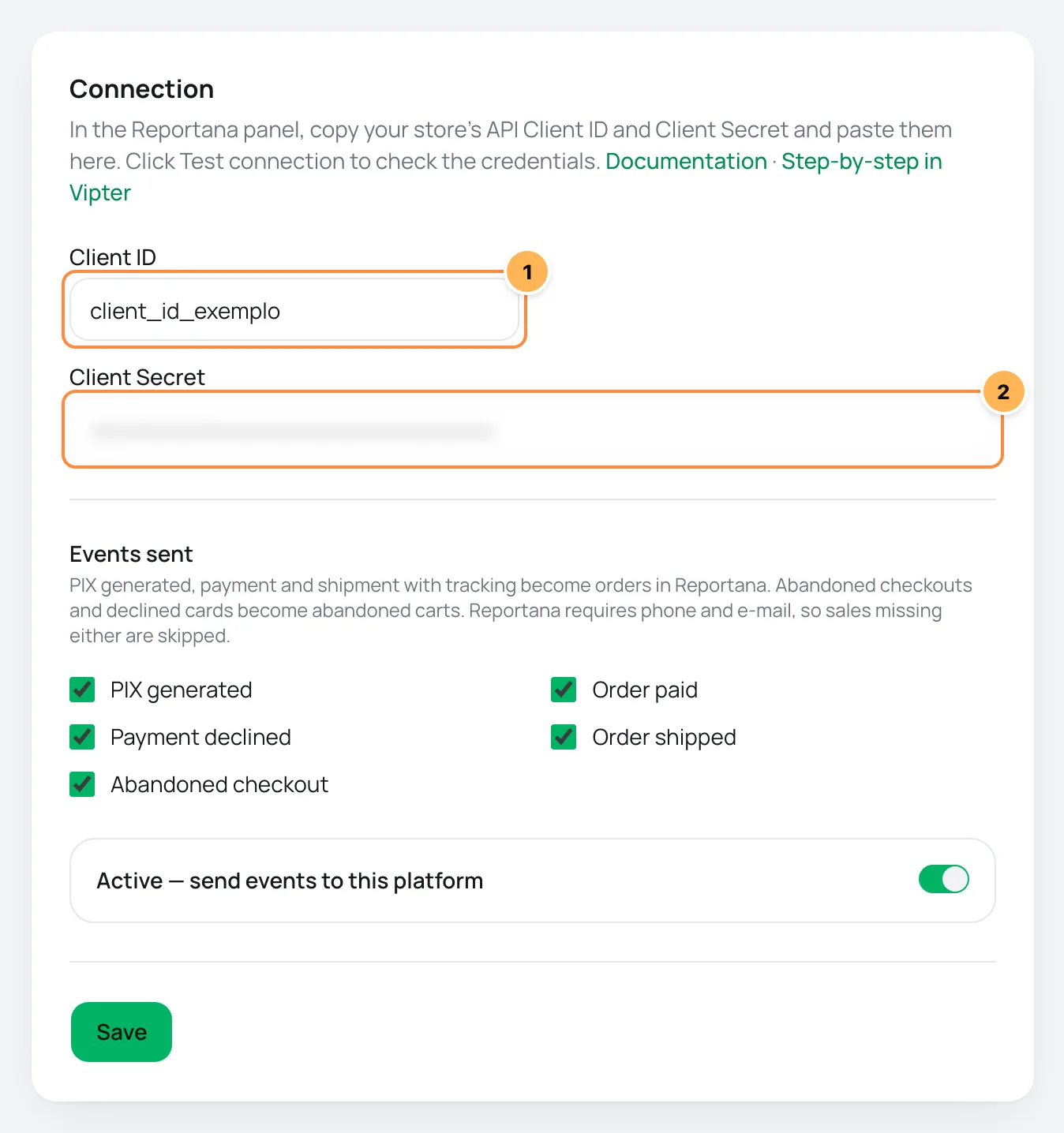
| # | Field | What to paste |
|---|---|---|
| 1 | Client ID | The API Client ID of your store in Reportana. |
| 2 | Client Secret | The Client Secret, copied along with the Client ID. |
- Under Events sent, uncheck what you don't want to send. The list only shows the five events Reportana receives.
- Leave Active — send events to this platform on and click Save.
Step 3: test
- Click Test connection. Vipter sends Reportana an empty order: Reportana checks the credentials and rejects the order for lack of data, without creating anything. You see Connection works.
- Open the checkout of an offer, fill it in with your e-mail and your phone and generate a PIX, without paying. Then reload the Reportana page in Vipter.
It worked if
The PIX generated event shows as sent under Recent deliveries, and the order shows up in Reportana as pending, with the PIX code.
What Reportana receives
PIX generated, payment and shipment with tracking become orders in Reportana. Abandoned checkouts and declined cards become abandoned carts. Reportana requires phone and e-mail, so sales missing either are skipped.| Event in Vipter | In Reportana |
|---|---|
| PIX generated | Pending order (PENDING), with the PIX copy-and-paste code, the link and the expiration date |
| Order paid | The same order, paid (PAID) |
| Order shipped | The same order, paid and with the tracking code. Reportana follows the tracking |
| Payment declined on a card | Abandoned cart with the declined card reason (DECLINED_CREDIT_CARD), which is how Reportana recovers the card |
| Payment declined on another payment method | The order, not paid (NOT_PAID) |
| Abandoned checkout | Abandoned cart, with the link that restores the cart |
- The order is identified by its order number in Vipter. That is why the PIX generated, the payment and the shipment update the same order in Reportana.
- Amounts go in reais (R$), such as
169.90, and dates in Brasília time. - Each order bump becomes one more item, with its own price.
- The order carries the link to open it in the Vipter dashboard.
Reportana has no status for refund, chargeback, delivery or subscription. These events do not show in the list and are not sent.
Deliveries, retries and resend
- sent: Reportana accepted the order or the cart.
- skipped: the phone is missing (
customer has no phone (Reportana requires customer_phone)) or the e-mail is missing (customer has no e-mail). - failed: Reportana rejected it or did not answer. A rejection, such as wrong credentials or a field it did not accept, is not repeated. Temporary failures get automatic retries.
After you fix the cause, use Resend. See retries and resend.
Common problems
-
The platform refused the credentials with code 401
The Client ID or the Client Secret is wrong. Copy both again and save. To change just one, fill in that field and leave the other blank.
-
The events show as skipped for lack of a phone or an e-mail
Make the checkout ask for both. Reportana does not accept an order without a phone and an e-mail.
-
The event failed with 422
Reportana rejected a field of the order. Its message shows in red, with the field. The resend repeats the sale data as it was in the event: if the problem is in the buyer's data, handle that sale directly in Reportana.
What to do next
- Also recover carts by e-mail with the abandoned checkout.
- Mark physical orders as shipped in Mark shipping and delivery so Reportana receives the tracking.
Connect SellFlux
Send every sale event to a SellFlux Custom integration, with phone, PIX code, recovery link and tracking, and build the recovery automations there.
Connect Google Sheets
Write a row to a Google spreadsheet on every sale event, with an Apps Script you deploy on your own account, without signing in to Google in Vipter.