Connect Leadlovers
Place the buyer in a Leadlovers machine, sequence and level on every sale event, with one funnel per event and another per offer for buyers.
With Leadlovers connected, every Vipter sale event creates or updates the lead by e-mail and places them in the machine, the e-mail sequence and the level you chose for that event. Whoever generates a PIX enters the PIX reminder funnel, whoever buys enters the product funnel, whoever abandons the checkout enters the recovery funnel.
Before you start, read how automations work.
Before you start
- A Leadlovers account with the machines and sequences already created.
- The Admin or Owner role in the Vipter project.
Step 1: copy the token and the codes in Leadlovers
- In your Leadlovers account settings, copy the API token pessoal (personal token).
- For each funnel you will use, write down three codes: the máquina (machine), the e-mail sequência (sequence) and the nível (level) where the lead should enter. Leadlovers shows these codes on the machine screen.
Vipter has not confirmed the exact path of these menus. If you can't find the token or the codes, ask Leadlovers support.
Keep the token safe
This token can create and move leads in your account. Paste it only into Vipter. Once saved, the field only shows its last characters.
Step 2: connect in Vipter
- In the Vipter dashboard, open GeneralIntegrationsCRM and email marketingLeadlovers.
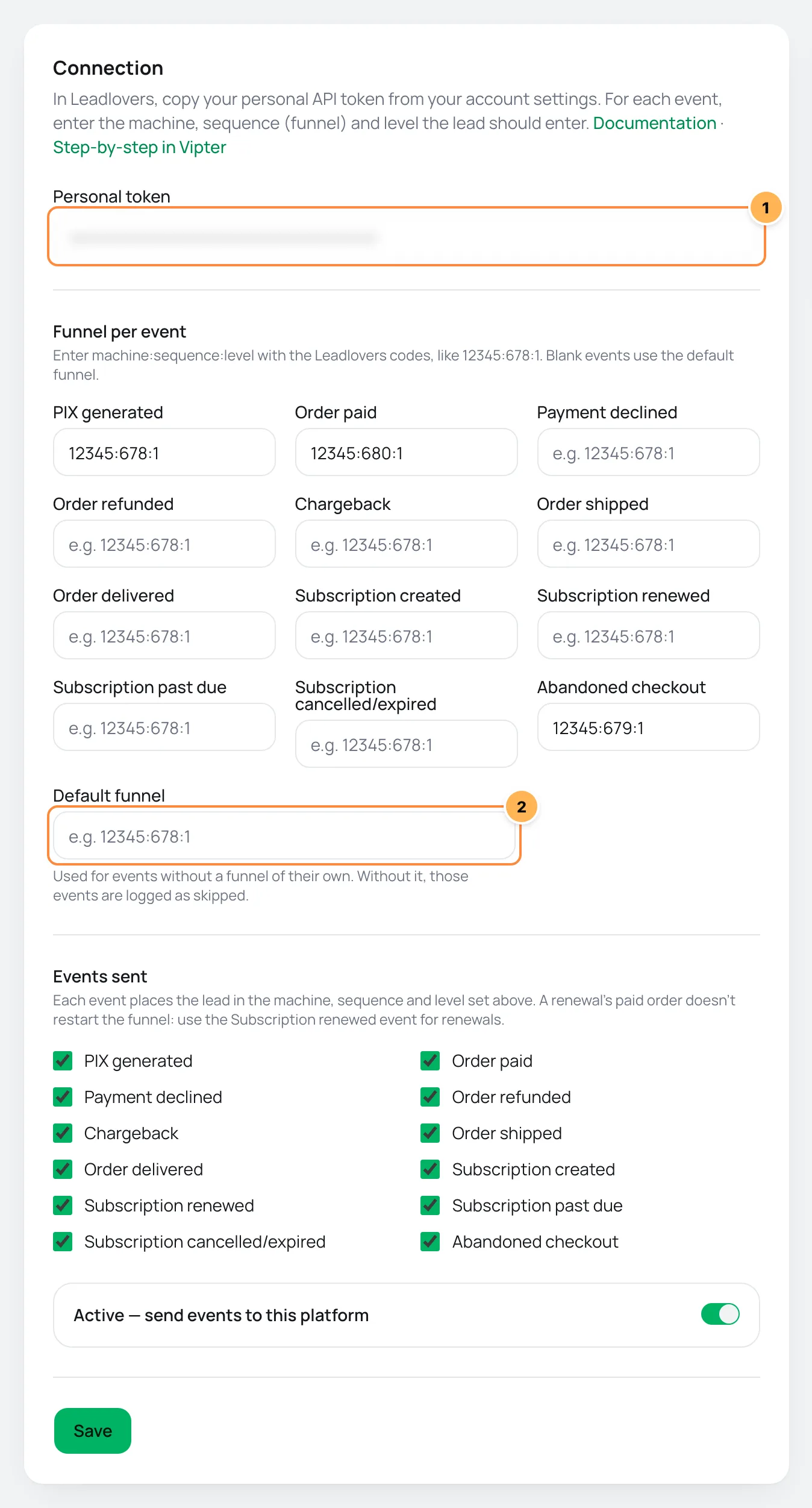
- Under Connection, fill in the numbered fields.
| # | Field | What to paste |
|---|---|---|
| 1 | Personal token | The API personal token, copied in step 1. |
| 2 | Default funnel | The funnel for the events left blank, in the machine:sequence:level format. Without it, those events show as skipped. |
- Under Funnel per event, enter each event's funnel in the
machine:sequence:levelformat, with the codes from step 1. - Under Events sent, uncheck what you don't want to send.
- Leave Active — send events to this platform on, click Save and then Test connection.
An example of funnel per event:
| Event | Funnel | What it means |
|---|---|---|
| PIX generated | 12345:678:1 | Machine 12345, sequence 678, level 1 |
| Abandoned checkout | 12345:679:1 | The recovery sequence of the same machine |
| Order paid | 12345:680:1 | The welcome sequence |
| Subscription renewed | 12345:681:1 | The renewal sequence |
Each field accepts a single funnel, with the three numbers separated by colons. Any other format shows Invalid value for this platform..
Step 3: use one funnel per offer (optional)
- Under Funnel per offer, pick the Offer.
- Enter the Funnel (machine:sequence:level), such as
22222:333:1. - Click Add rule.
Optional: buyers of this offer enter this funnel when the order is paid. The offer's other events follow the funnel per event. In the example, whoever pays for Course X enters 22222:333:1 instead of 12345:680:1. A PIX generated or an abandoned cart for Course X stays in the event's funnel. The rule also applies to the other offers of the same product.
What happens on each event
- The lead is created or updated by e-mail and placed in the event's machine, sequence and level. A repeated event for the same buyer doesn't fail with "lead already exists".
- The name goes along, plus the phone with country code in digits only (such as
5541988887777), the city, the state, the sale's UTMs and the sourceVipter. - On PIX generated and abandoned checkout, the link to resume the purchase goes as the abandoned cart link.
Renewals use their own event
A subscription renewal also generates Order paid. To avoid putting the subscriber back on the first level of the purchase funnel every month, Vipter skips that paid order: use the Subscription renewed event for renewals. The renewal's paid order shows as skipped, with renewal orders use the subscription renewed event.
Deliveries, retries and resend
- sent: the lead entered the funnel.
- skipped: the sale has no e-mail, the event has no funnel (
no Leadlovers machine:sequence:level for …), the value is not in the right format (… is not machine:sequence:level) or it is the paid order of a renewal. - failed: Leadlovers refused or did not answer. A refusal, such as a wrong token or a code that doesn't exist, is not retried. Temporary failures get automatic retries.
An event skipped for lack of a funnel can be sent later: fill in that event's funnel, save and use Resend. See retries and resend.
Common problems
-
The platform refused the credentials
The token is wrong. Copy it again from your Leadlovers account settings.
-
The delivery failed with
BadRequestThe machine, the sequence or the level doesn't exist, or the level doesn't belong to that sequence. Check the three codes on the machine screen.
-
The lead did not enter the product funnel
The funnel per offer only applies to the paid order. Check that the rule belongs to the offer sold or to another offer of the same product.
What to do next
- Understand values per event and offer rules.
- See the events sent and when each one goes out.
Connect Brevo
Create and update the contact in Brevo on every sale event and add the buyer to the lists you choose per event and per offer.
How member areas work
Learn when Vipter grants and removes the buyer's access in MemberKit, Cademí, Membox, Curseduca, The Members or Circle, how rules per offer work, and how to follow, retry and resend each delivery.