Sales fee
How the plan's fee applies to the account's approved sales, what counts toward it, when it is charged to the card and where to track the cycle.
On top of the monthly fee, each Vipter plan charges a percentage of approved sales: the sales fee. The bigger the plan, the lower the fee. There is no order quota: every plan has unlimited orders. The fee of each plan is in Plans and limits.
The fee belongs to the owner's account and adds up the approved sales of all their stores. The fee cycle is the same as the monthly fee's: it starts and ends with the paid period.
How much the fee is
| Plan | Fee on approved sales |
|---|---|
| Lite | 2.5% |
| Start | 2.0% |
| Grow | 1.0% |
| Pro | 0.6% |
The cycle's fee is the sum of the cycle's approved sales times the plan's fee, rounded to the cent. Sales in another currency are converted to reais at the exchange rate of the day they were paid.
What counts toward the fee
The amount of each approved order in one of your stores counts:
| Counts | Doesn't count |
|---|---|
| One-time sale, with the order bump that went into the same order | Start of a trial period with no charge |
| First charge of a subscription | Card validation with no charge |
| Each subscription renewal | Orders from the demo store and exempt stores |
| Each purchase accepted in the one-click upsell | Purchases made on a test connection |
| Each subscription extra charge | |
| Each sale made from the dashboard on the saved card | |
| Order marked as paid by hand |
Refunds don't give the fee back
A refunded or charged-back order still counts toward the fee, because the sale was processed and paid. A small real purchase made to test also counts, even after a refund. To test without a fee, use a test connection, see Test the store before selling.
Track the cycle's fee
Open Vipter plan from your profile picture menu. The Fee this cycle card shows the cycle's period and:
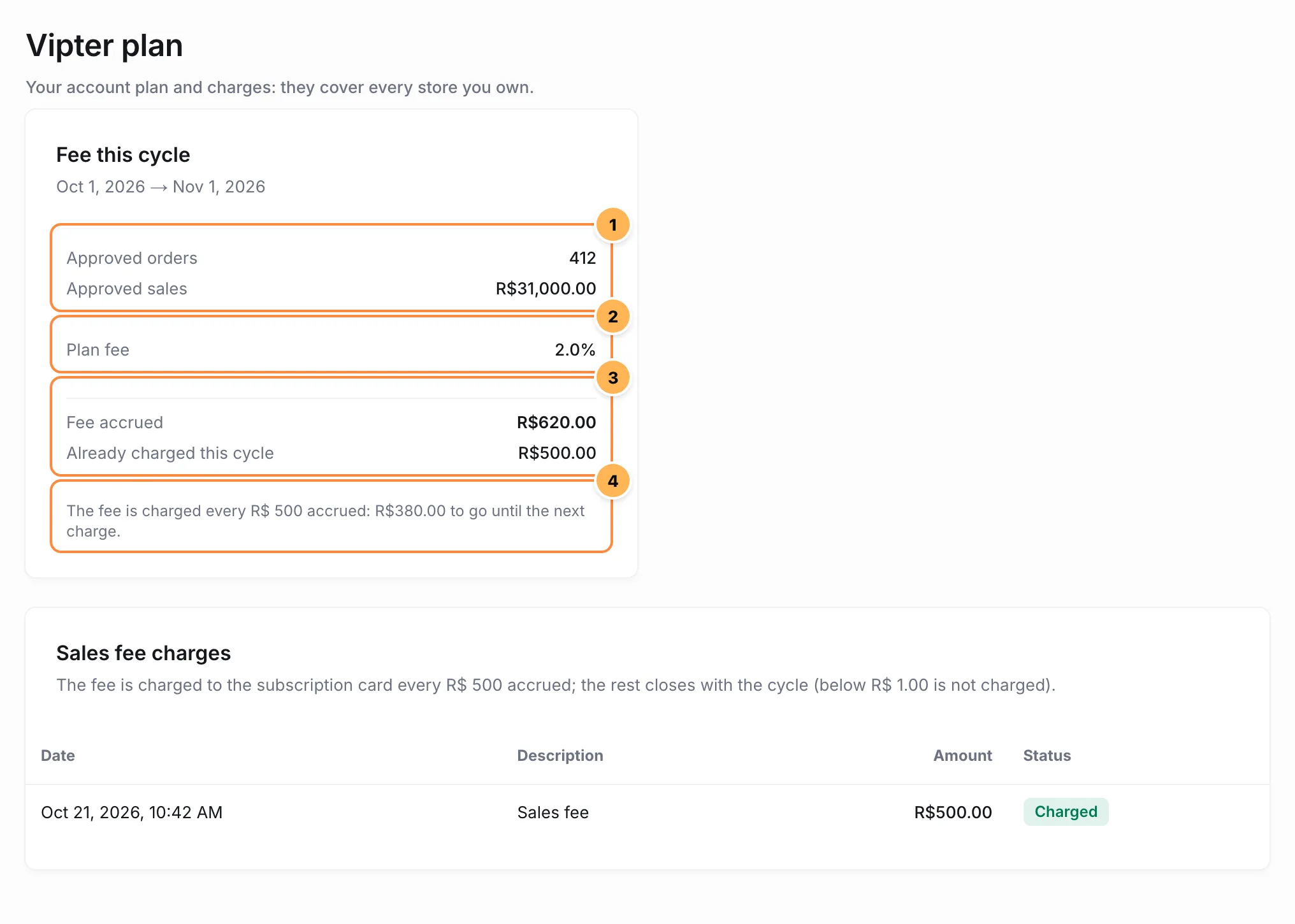
- Approved orders and Approved sales: how many orders were approved in the cycle and how much they add up to, in reais.
- Plan fee: your plan's percentage.
- Fee accrued and Already charged this cycle: how much the cycle's fee adds up to so far and how much of it has already been charged.
- The fee is charged every R$ 500 accrued: R$ 120.00 to go until the next charge.
Below, the Sales fee charges table lists each fee charge, with the date, the amount and the status.
The count is refreshed every 10 minutes and whenever the plan page opens.
How the fee is charged
The fee is charged to the subscription card every R$ 500 accrued; the rest closes with the cycle (below R$ 1.00 is not charged).- Every R$ 500 of fee: when the fee accrued in the cycle reaches another R$ 500, Vipter charges that amount to the plan's card. If several R$ 500 blocks closed since the last charge, they go out in a single charge.
- Cycle close: at the end of the cycle, the rest that didn't complete a block is charged, marked as cycle close. A rest below R$ 1.00 is not charged.
- Nothing is charged twice: each charge picks up where the previous one stopped.
Example on Start (R$ 149.00 per month and a 2.0% fee). With R$ 40,000.00 in approved sales in the cycle, the fee is R$ 800.00. When sales pass R$ 25,000.00, the fee accrued reaches R$ 500.00 and Vipter charges that amount. At the end of the cycle, it charges the remaining R$ 300.00. In the month, the account paid R$ 149.00 of monthly fee and R$ 800.00 of sales fee.
Example on Lite (R$ 4.99 per month and a 2.5% fee). With R$ 2,000.00 in sales in the cycle, the fee is R$ 50.00, charged in full at the cycle close.
The status of each charge:
| Status | What it means |
|---|---|
| Pending | Created, waiting to be charged. |
| Charging | Being charged to the card now. |
| Charged | Paid. |
| Failed | The card declined. Vipter tries again. See Past-due payment and blocked sales. |
| Waived | Vipter waived the charge. |
Paid charges also show in the Billing history, as Sales fee · 2026-10.
The store keeps selling normally, whatever the volume. What stops sales is a fee charge declined several times, see Past-due payment and blocked sales.
Change plans mid-cycle
When you change plans, the new plan's fee applies to the sales of the whole cycle, including those before the change. What was already charged is not refunded. To find out which plan is cheapest for how much you sell, see the Cheapest for monthly sales row in Plans and limits.
Common problems
-
The fee went up after a test purchase
The purchase went through a live connection, not the test one. Purchases on test connections don't count, but a real purchase counts even after a refund, and a refund doesn't give the fee back. Check in PaymentsRouting which connection charges each method.
-
The cycle's sales don't match the home dashboard
The cycle adds up all the owner's stores and all types of approved order in the plan's cycle, which doesn't match the calendar month. The home dashboard shows a single store, in the chosen period. Sales in another currency are converted to reais.
What to do next
- See what happens when a charge fails in Past-due payment and blocked sales.
- Compare the plans in Plans and limits.